
When it comes to storage in modern electronics, the eMMC vs SSD debate is one of the most common comparisons.
Both use NAND flash memory, but their design, performance, and application scenarios couldn’t be more different.
eMMC (Embedded MultiMediaCard) is widely used in budget phones, IoT devices, and embedded systems where simplicity, small size, and cost-efficiency matter.
M2, on the other hand, powers everything from high-performance laptops to gaming consoles and industrial PCs, offering significantly faster speeds and better upgradability.
In this guide, we’ll break down the architectural and practical differences between eMMC vs SSD.
You’ll find a detailed comparison covering speed, power efficiency, durability, packaging formats, capacity ranges, and use cases.
TL:DR
If your laptop, mini PC, handheld console, or desktop supports an SSD slot, always choose an M.2 NVMe SSD. It’s dramatically faster, far more durable under heavy writes, and fully upgradeable.
eMMC still makes sense in embedded systems, IoT devices, development boards, industrial controllers, automotive electronics, and budget laptops where long battery life, compact size, and soldered reliability matter more than raw speed.
What is eMMC?

eMMC (embedded MultiMediaCard)
eMMC (embedded MultiMediaCard) is a compact flash storage solution that integrates NAND memory and a basic controller into a single chip..
It follows JEDEC standards (up to v5.1) and is common in smartphones, Chromebooks, tablets, and embedded systems where cost and space efficiency matter.
Typically sized around 11.5 × 13 mm, eMMC chips use an 8-bit parallel MMC interface (HS200/HS400 modes) and handle wear leveling, error correction, and logical mapping internally.
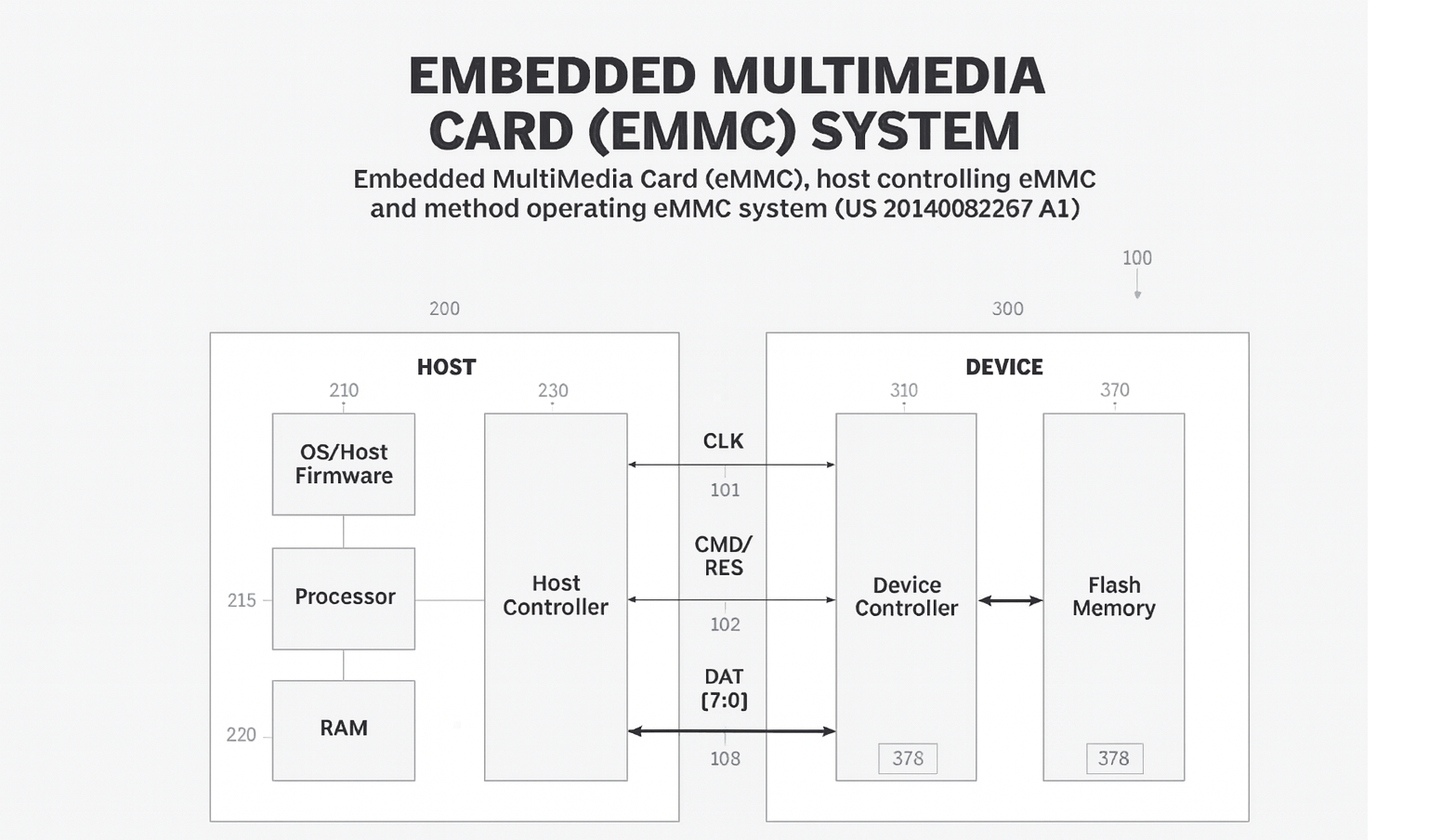
However, their half-duplex design prevents simultaneous reads and writes, limiting multitasking performance.
Sequential read/write speeds usually range from 200–400 MB/s and 100–200 MB/s, respectively, with lower random I/O performance due to a single-channel setup.
Capacities range from 4 GB to 128 GB, with some reaching up to 256 or 512 GB in niche use cases.
Modern mobile devices have largely moved to UFS storage, so eMMC is now commonly found in cost-sensitive or embedded designs. Its soldered form factor and low power consumption make it ideal for development boards (like the Raspberry Pi Compute Module 4), industrial IoT systems, automotive infotainment units, and small Linux-based controllers.
What is M2?
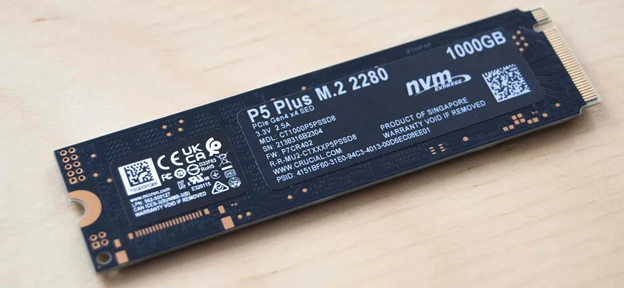
M.2 (formerly NGFF) is a compact, modular storage interface widely used in laptops, desktops, and embedded systems.
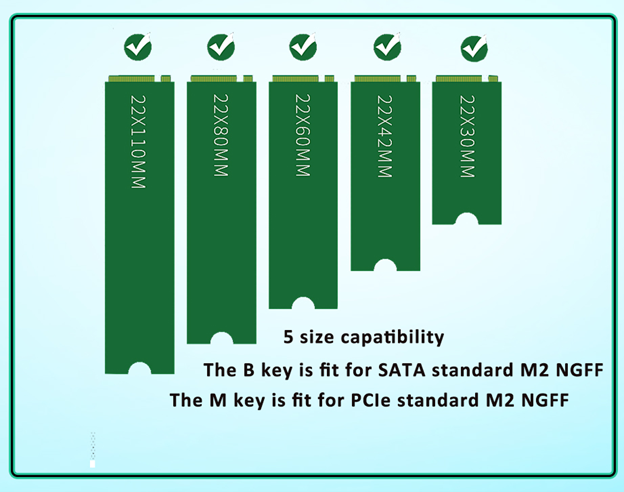
It supports both PCIe (NVMe) and SATA protocols. M.2 modules are 22 mm wide with varying lengths (2230 to 2280) and connect via a 75-pin edge connector.
They’re user-replaceable, upgradeable, and secured with a single screw.
Performance varies by interface: PCIe Gen3 NVMe SSDs reach ~3,500 MB/s, Gen4 up to 7,000 MB/s, and Gen5 over 10,000 MB/s, while SATA M.2 drives cap at ~550 MB/s.
Higher-end models support multi-channel flash, DRAM caching, and parallel queues for fast multitasking. In general, capacities range from 128 GB to 2 TB, with some exceeding 4 TB.
It’s important to note that M.2 is a form factor, not a speed standard. An M.2 drive may use:
- 2 SATA (up to ~550 MB/s)
- 2 NVMe PCIe Gen3 (up to ~3,500 MB/s)
- 2 NVMe PCIe Gen4 (up to ~7,000 MB/s)
- 2 NVMe PCIe Gen5 (over 10,000 MB/s in ideal cases)
This is why two M.2 drives can have very different speeds depending on the interface.
Modern devices such as gaming laptops, handheld consoles (Steam Deck 256 GB/512 GB, ROG Ally), and ultrabooks rely heavily on M.2 NVMe storage for fast boot times and seamless multitasking.
|
Feature |
eMMC |
M.2 SSD (NVMe/SATA) |
|
Typical Use |
Budget devices, IoT, Chromebooks, industrial |
Laptops, desktops, gaming, professional workloads |
|
Upgradeable |
No (soldered) |
Yes (swap anytime) |
|
Max Speed |
~400 MB/s |
550 MB/s – 10,000+ MB/s |
|
Random I/O |
Low |
High (advanced controller, queues) |
|
Capacity |
4–128 GB |
128 GB–8 TB (consumer) |
|
Power Draw |
Extremely low |
Moderate |
|
Best For |
Embedded & low-cost devices |
Any performance-oriented device |
eMMC Speed vs M2 Speed
When it comes to storage performance of eMMC vs SSD, SSDs such as M2 outperform by a wide margin across all major metrics.
Below, we break down the key differences in real-world terms.
Sequential Read/Write Speeds
eMMC (v5.1) supports up to 400 MB/s read and 125–200 MB/s write in ideal conditions. Performance often dips under sustained loads due to limited parallel processing.
M2 SSDs offer much higher sustained speeds:
| M.2 Type | Interface | Typical Read Speeds |
|---|---|---|
| M.2 SATA | SATA III | ~550 MB/s (upper limit) |
| M.2 NVMe (PCIe Gen3) | PCIe 3.0 x4 | ~3,000–3,500 MB/s |
| M.2 NVMe (PCIe Gen4) | PCIe 4.0 x4 | ~5,000–7,000 MB/s |
| M.2 NVMe (PCIe Gen5) | PCIe 5.0 x4 | >10,000 MB/s (ideal cases) |
While eMMC may match older SATA SSDs on paper, it fails to maintain throughput during large transfers. NVMe drives, with their wider bandwidth and multi-channel access, maintain high speeds even under heavy workloads.
Random I/O and Multitasking
Think of eMMC as a single-lane road and NVMe SSDs as a multi-lane highway.
While eMMC handles only one major request at once, NVMe SSDs manage tens of thousands of simultaneous operations thanks to multiple queues, deep parallelism, and advanced controllers.
eMMC is limited by its half-duplex interface and single flash channel. It can only handle one operation at a time and lacks advanced queuing capabilities.
By contrast, M.2 NVMe SSDs support:
- Parallel read/write operations
- Up to 64K queues with 64K commands each
- Tens to hundreds of thousands of IOPS for random 4K reads/writes
This makes SSDs far superior for real-world multitasking such as booting, app switching, file indexing, or OS updates.
Throughput Under Load
In sustained workloads, eMMC often becomes a bottleneck due to limited flash dies and sequential-only task handling.
M.2 SSDs, with multiple NAND chips and higher controller performance, maintain throughput even under pressure.
Real-world benchmarks show that tasks like OS boot, application launch, and large file transfers can be 2× to 10× faster on M.2 SSDs compared to eMMC.
Latency
Both technologies are flash-based and significantly faster than HDDs, but:
- eMMC latency: ~100 microseconds or more (due to simpler controllers and interface overhead)
- NVMe SSD latency: ~25–50 microseconds or less (due to the NVMe protocol and PCIe link)
Lower latency in NVMe drives results in quicker response times across all operations, especially when handling many small files or I/O-heavy workloads.
For readers evaluating system expansion beyond storage, it’s worth understanding the broader differences between PCI and PCIe interfaces.
Although M.2 NVMe SSDs use the PCIe standard for ultra-fast data transfer, many legacy boards and industrial systems still use PCI for expansion cards like serial adapters.
We’ve covered this in detail in our guide: PCIe vs PCI Serial Cards in 2025: What’s Best for Your Build?, which can help you choose the right interface for your project.
eMMC vs SSD Durability
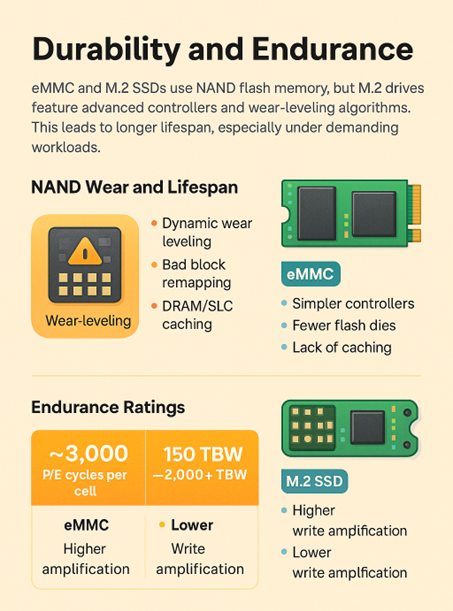
Both eMMC and M.2 SSDs use NAND flash, but their endurance varies significantly due to differences in architecture, controller sophistication, and intended use cases.
Let’s break down how these differences impact real-world reliability, especially under prolonged or write-intensive workloads.
NAND Wear and Lifespan
All flash memory degrades over time due to limited program/erase (P/E) cycles per memory cell.
To extend lifespan, storage devices implement wear-leveling algorithms that evenly distribute write and erase operations across the memory array.
M.2 SSDs typically use multi-channel controllers that support advanced features such as Dynamic wear leveling, Bad Block remapping, Over-provisioning, TRIM support, and DRAM/SLC caching.
These features reduce write amplification and ensure better distribution of data across cells, which greatly improves longevity.
In contrast, eMMC storage is more basic. It generally has simpler controllers, fewer flash dies (often just one), less aggressive wear leveling and no DRAM or SLC caching.
Endurance Ratings: P/E Cycles vs. TBW
Manufacturers specify endurance differently depending on the storage type:
| Metric | eMMC | M.2 SSD (NVMe/SATA) |
| Typical Endurance | ~3,000 P/E cycles per cell | 150 TBW – 2,000+ TBW depending on model |
| Units | P/E cycles (per cell) | TBW (Terabytes Written), DWPD |
| Write Amplification | Higher (due to simpler controllers) | Lower (advanced algorithms, caching) |
| Lifetime Monitoring | Often unavailable or basic | SMART monitoring, health metrics |
A 16 GB eMMC rated for 3,000 cycles might only handle ~48 TB of writes before cell failure. For comparison, a mid-range 512 GB M.2 SSD might be rated for 300 TBW or more.
A Chromebook with 32 GB eMMC will struggle under daily software updates and caching tasks over time.
A laptop with a 512 GB M.2 SSD can support years of heavy data transfers, video editing, or virtual machines without noticeable degradation.
Replaceability and Failure Handling
Since eMMC is soldered directly to the mainboard, failures are often fatal to the entire device. This makes repair impractical for most users.
M.2 SSDs, on the other hand, are easily replaceable, enabling long-term device servicing and upgrades.
That said, the soldered nature of eMMC makes it more reliable in rugged environments like automotive systems, industrial controllers and portable embedded devices.
In those cases, physical shock or vibration can’t loosen a connection.
Thermal Considerations and Longevity
Heat is a major factor in flash memory ageing. Higher temperatures accelerate wear, reduce retention time, and trigger thermal throttling.
eMMC generally stays cool due to lower performance and power draw. NVMe SSDs can heat up under sustained writes and multitasking, requiring heatsinks or firmware-based thermal throttling.
| Attribute | eMMC | M.2 SSD (NVMe) |
| Typical Operating Temp | ~40–60°C (cool operation) | ~50–70°C (can spike to >80°C) |
| Throttling | Rare (low workload) | Common under load if not cooled |
| Heatsink Required | No | Often (especially PCIe Gen4+) |
eMMC vs SSD Power
Power consumption is a critical factor when selecting storage, especially for battery-powered or thermally constrained devices.
In this regard, eMMC and M.2 SSDs represent two different priorities: eMMC is optimized for ultra-low power use.
In contrast, M.2 SSDs (especially NVMe models) prioritize performance and consume more power as a result.
Active Power Draw
eMMC excels in low-power operation. Its architecture is simple: one flash channel, moderate speeds (~400 MB/s), and tight SoC integration. This results in very low active power draw:
- Typical active consumption: between 100–500 milliwatts
- Peak consumption: rarely exceeds 1 W, even under load
This makes eMMC ideal for embedded platforms, smartphones, and IoT where power budgets are tight.
By contrast, M.2 SSDs consume more power under load, especially PCIe NVMe variants:
- M.2 SATA SSDs: ~2–3 W during active usage
- M.2 NVMe Gen3: ~4–6 W under full load
- M.2 NVMe Gen4: often exceeds 7 W during sustained transfers
This power is necessary to deliver high throughput, but it also increases thermal output and energy usage in mobile scenarios.
Idle and Sleep Behavior
eMMC leads in idle efficiency. It supports deep sleep states in mobile SoCs that consume microamps or less. This ensures negligible drain when idle.
NVMe SSDs, while improving, still lag slightly in ultra-low-power states:
- Idle power for eMMC: <1 mW (microamp-level deep sleep)
- NVMe SSDs (best-case idle): as low as 5–50 mW in low-power states
- Consumer NVMe SSDs (typical idle): often 0.5–1 W without aggressive power tuning
M.2 SATA SSDs can idle lower than NVMe models (~0.1 W), but still not as low as eMMC.
Power Efficiency per Task
Peak wattage isn’t the whole story. Efficiency is also about how fast storage finishes the job:
- NVMe SSDs, despite higher power draw, complete large file transfers or OS updates much faster than eMMC.
- This means the system can return to idle sooner, potentially using less total energy per gigabyte transferred.
In short bursts of heavy activity, NVMe can actually be more energy-efficient despite drawing more power, due to its speed.
But for devices that perform mostly light tasks or spend most time idle, eMMC’s constant low power draw is still the more efficient choice.
eMMC vs SSD Use Cases and Application Scenarios
Due to differences in speed, form factor, power efficiency, and upgradeability, eMMC vs SSD storage tends to serve different types of devices and users.
Below is a breakdown of their most common application scenarios and the reasons behind those choices.
eMMC
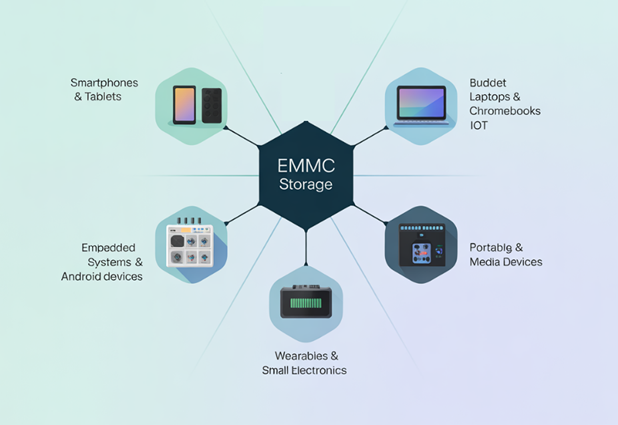
1. Smartphones and Tablets (Mid to Budget Range)
eMMC was the default storage in Android smartphones and tablets for much of the 2010s. It offered a compact, integrated storage solution with low power consumption, which made it ideal for mobile devices.
Many older devices, like the Samsung Galaxy S5 shipped with eMMC.
Today, while premium phones have shifted to UFS, eMMC still appears in entry-level or cost-sensitive Android devices and tablets.
A typical modern budget tablet might still list “32 GB eMMC” in its specs.
2. Budget Laptops and Chromebooks
eMMC is common in entry-level Windows laptops and Chromebooks, where it helps manufacturers hit low price points.
Devices priced under $300 often include 32 to 128 GB eMMC as internal storage. Examples include the base Microsoft Surface Go 3 and many Chromebooks targeting students or light users.
These machines are designed for basic web tasks, streaming, and document editing, not heavy multitasking or storage-intensive work.
While eMMC performs adequately in these environments, it is non-upgradeable and slows down under pressure. Many users rely on cloud storage to compensate for its limitations.
3. Embedded Systems and IoT Devices
In embedded computing and industrial environments, eMMC’s soldered form, reliability, and small footprint make it a go-to solution.
It is used in development boards like Raspberry Pi Compute Module 4 as an alternative to microSD.
It is also found in automotive infotainment systems, digital signage, industrial controllers, and other embedded Linux devices. Automotive-rated eMMC chips are available with long-term supply guarantees and extended temperature tolerances.
IoT applications benefit from its small size and integration. Storage capacities of 8 to 32 GB are often sufficient for firmware, logs, and configuration files. In these use cases, reliability and cost are bigger factors than speed.
4. Portable Gaming and Media Devices
eMMC occasionally appears in entry-level gaming handhelds and portable media players.
For example, the base model Steam Deck comes with 64 GB of eMMC storage, while higher-end models use faster NVMe SSDs. Other affordable devices may opt for eMMC to reduce cost while still offering basic local storage.
5. Wearables and Small Electronics
Devices like smartwatches, VR headsets, and smart appliances sometimes use eMMC or similar embedded flash for firmware and basic data storage.
These use cases benefit from space savings, reliability, and low power draw. Since storage is rarely upgraded in such devices, soldered solutions like eMMC are well-suited.
M2 SSD
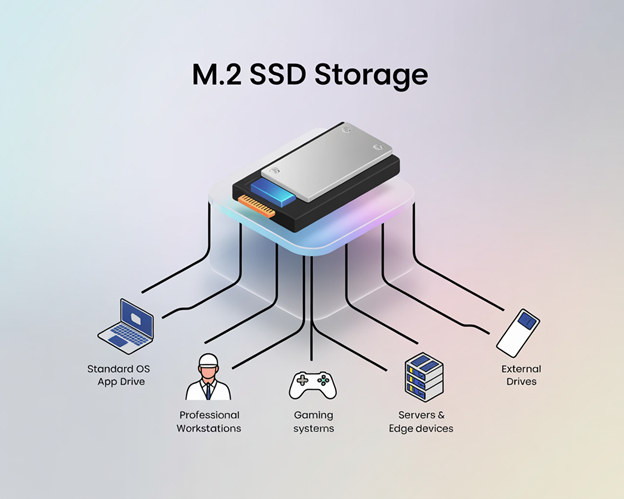
1. Primary Storage in Laptops and Desktops
M.2 SSDs, especially NVMe-based, are the standard storage solution in modern consumer and business computers.
Thin ultrabooks, gaming laptops, and desktop PCs use M.2 drives for the OS and application storage. Common capacities range from 256 GB to 2 TB, with enthusiasts using 4 TB or more.
M.2 SSDs offer fast boot times, quick app launches, and high sustained read and write performance, which is especially useful for users working with large files or multitasking heavily.
Even budget systems may include M.2 SATA drives for cost savings, although NVMe is increasingly the norm.
2. High-Performance Workloads (Creators, Engineers, Professionals)
M.2 NVMe SSDs are essential for users who require high-speed storage for intensive tasks such as compiling large codebases, editing 4K and 8K video content, running multiple virtual machines, and performing CAD or data science work.
Many professionals use multiple M.2 drives for separation of OS, scratch disks, and project storage. The compact size of M.2 makes it possible to pack a large amount of fast storage into a small PC build.
3. Gaming Consoles and Gaming PCs
Gaming is one of the most demanding consumer storage workloads, and M.2 NVMe SSDs are the standard in modern gaming systems.
The PS5 and Xbox Series X use custom NVMe SSDs for fast load times. The PS5 also allows M.2 NVMe expansion, letting users add standard PCIe 4.0 drives.
Gaming PCs and handhelds like the Steam Deck 256 GB and 512 GB models use M.2 2230 drives for compact, high-speed game storage.
NVMe’s high throughput is crucial for loading open-world assets, reducing game stutter, and speeding up level transitions.
4. Servers and Edge Devices
In server environments, M.2 SSDs are often used for boot drives in compact systems or as caching tiers to accelerate traditional storage arrays.
Many server motherboards feature M.2 slots that save space and provide fast boot performance.
While larger enterprise setups often use U.2 or EDSFF drives, M.2 remains common in edge computing and embedded servers where space is limited.
5. External SSDs and Enclosures
Many portable USB-C or Thunderbolt SSDs are internally based on M.2 modules inside an enclosure.
Users can also repurpose an M.2 drive inside a USB enclosure to create a DIY external SSD.
These drives are popular for fast file transfers, bootable installers, or portable game libraries.
Capacity Ranges and Product Examples
eMMC
eMMC modules typically range from 8 GB to 128 GB, with 256 GB available in higher-end embedded or industrial applications.
While 512 GB models do exist, they’re rare and not commonly found in consumer-grade products.
Most budget laptops and devices top out at 128 GB, often soldered directly to the board.
Examples from real-world usage include:
- 32 GB or 64 GB eMMC in entry-level Chromebooks
- 128 GB in some affordable Windows laptops (rare upper limit for eMMC)
- Valve Steam Deck 64 GB model using built-in eMMC
- 16–32 GB Samsung or Hynix eMMC in HP Chromebook 11
- Tablets, media boxes, smart TVs, drones, and appliances commonly use Samsung or SanDisk eMMC modules
Leading eMMC product lines include:
- Samsung eMMC 5.1 series (e.g., KLMCG8GEAC-B001)
- SanDisk iNAND 7250 series (used in Android and tablets)
- Kingston EMMC04G (4 GB) and EMMC128-TY (128 GB)
- Micron automotive-grade eMMC, built for thermal endurance and long supply cycles
While the cost and power efficiency make eMMC attractive, the limited capacity and fixed soldered design restrict its use to budget devices and embedded platforms where minimal local storage is acceptable.
A practical example is the Kioxia THGBMJG7C1LBAIL, a 16 GB eMMC 5.1 module in a 153-WFBGA package. This is ideal for compact devices with limited space.
M.2 SSD
M.2 SSDs span a wide capacity range from 128 GB all the way up to 8 TB for consumers, and up to 16 TB in specialized enterprise configurations.
The most common sizes for everyday users are 256 GB, 512 GB, and 1 TB, which strike a balance between performance, cost, and available storage.
High-performance and mainstream M.2 NVMe SSD examples include:
- Samsung 970 EVO Plus (PCIe Gen3, up to 2 TB, ~3500 MB/s)
- Samsung 980 Pro / 990 Pro (PCIe Gen4, up to 2 TB, ~7000 MB/s)
- Western Digital SN850X (PCIe Gen4, 1–4 TB)
- Crucial P5 Plus (up to 2 TB)
- Sabrent Rocket 4 Plus (available up to 8 TB)
- WD Blue SN570, Crucial P3 – budget NVMe drives with no DRAM, but still far ahead of eMMC
For systems restricted to SATA, M.2 SATA options include:
- Samsung 860 EVO (M.2 SATA)
- Crucial MX500 (M.2 SATA)
Both offer ~550 MB/s and are still used in older business laptops.
One of the examples is Swissbit SFSA030GM3AA1TO-C-LB-526-STD. It is a 30 GB M.2 SATA drive reaching up to 520 MB/s. This reflects the typical SATA upper limit.
OEM integrations are also widespread. Laptops from Dell, HP, Lenovo, and others often ship with M.2 NVMe drives from SK Hynix, Kioxia, or Western Digital, typically in 256 GB to 1 TB capacities.
Final Thoughts
These drives all conform to the M2 form factor, either 2280 (most common) or occasionally 2230 for compact devices like handhelds or thin ultrabooks.
As technology evolves, so do the roles of eMMC and M.2 storage. While eMMC is gradually being phased out in favor of newer embedded storage technologies, M.2 SSDs continue to lead in performance-driven computing with rapid advances in speed, density, and protocol design.
The choice among eMMC vs SSDs ultimately comes down to what your project needs most.
eMMC still holds value in embedded environments where space is limited, power budgets are tight, and workloads are predictable.
It’s a mature, low-cost option that continues to serve well in IoT devices, development boards, and industrial systems that don’t need high-speed data transfers.
In contrast, M.2 SSDs have become the backbone of modern computing, offering fast boot times, high IOPS, and multi-terabyte capacities in a compact form.
With ongoing advancements in interface speed (PCIe Gen4, Gen5, and beyond), NAND density, and NVMe protocol support, M.2 drives are well-positioned to meet the demands of everything from gaming and content creation to edge AI and data logging.
As you weigh your options, consider not just storage size, but also endurance, power efficiency, future upgrade paths, and how the storage integrates into your design.
If you’re building embedded platforms, industrial controllers, or compact computing systems, Flywing Tech offers a wide range of storage-friendly components from reliable eMMC-compatible sockets and modules to M.2-ready connectors, thermal pads, and rugged accessories.

Frequently Asked Questions (FAQ)
1. What is the main difference between eMMC vs SSD?
eMMC (embedded MultiMediaCard) is a compact, soldered storage solution often used in budget laptops, tablets, and embedded systems.
M.2 SSDs are modular, higher-performance drives available in SATA or NVMe formats, widely used in modern laptops, desktops, and high-speed applications.
2. Which one is faster: eMMC vs SSD?
M.2 SSDs are much faster. For example, PCIe Gen4 M.2 drives can exceed 7 GB/s, while eMMC typically maxes out at around 400 MB/s.
3. Can I upgrade my eMMC storage to an M.2 SSD?
In most cases, no. eMMC is soldered to the device’s motherboard and not user-replaceable. If your device has an available M.2 slot, you can add an M.2 SSD separately, but most budget laptops with eMMC don’t include one.
4. Is eMMC reliable for long-term use?
Yes within its intended use case. eMMC is durable enough for light workloads like OS storage, app installs, and occasional file transfers. However, under heavy write workloads (e.g., video editing, daily large data transfers), its endurance is lower compared to an M.2 SSD.
5. Which is better for battery life: eMMC vs SSD?
eMMC generally consumes less power, making it ideal for battery-powered IoT devices, tablets, and low-power laptops. However, NVMe SSDs can sometimes be more efficient for large transfers because they complete tasks much faster and return to idle sooner.
6. What capacities are available for eMMC vs. SSD?
eMMC typically ranges from 4 GB to 128 GB, with some industrial versions reaching 256 GB. M.2 SSDs start at 128 GB and go up to 8 TB in consumer models, with enterprise versions exceeding 16 TB.
7. Can I use M.2 SSDs in embedded or rugged environments?
Yes, especially industrial-grade M.2 SSDs like Swissbit’s wide-temperature modules from Flywing Tech, which are designed for extended temperature ranges and high reliability. However, eMMC’s soldered design can be more resistant to shock and vibration in some automotive or industrial settings.
8. Which is better for gaming: eMMC vs SSD?
M.2 NVMe SSDs are far superior for gaming. They offer faster load times, smoother streaming of game assets, and better performance in open-world games. Devices with eMMC storage are generally unsuitable for modern gaming workloads.
9. Why is eMMC still used if it’s slower?
eMMC remains popular in cost-sensitive designs, small electronics, and embedded systems due to its low price, compact size, and low power consumption. It’s also easier to integrate into space-constrained devices.
10. Where can I find industrial-grade eMMC and M.2 SSDs?
Flywing Tech offers a range of storage solutions, from compact eMMC modules for embedded boards to high-performance NVMe M.2 drives for industrial and commercial applications. Visit flywing-tech.com to explore the full catalog.
