Selecting between DDR4 vs DDR5 is not a “newer is better” decision when you’re building embedded AI systems.
At the edge, RAM is not just for the OS. It holds camera frame buffers, pre-processing pipelines, model weights, and the working data that keeps your CPU, iGPU/NPU, or accelerator fed in real time.
If memory bandwidth or capacity becomes the bottleneck, your system drops frames, adds latency, or forces you to shrink the model.
This guide is written for embedded system designers, R&D engineers, and OEM teams building industrial PCs, edge gateways, and AI-enabled IoT devices.
We’ll compare DDR4 RAM vs DDR5 RAM through the lens of real edge workloads: multi-camera vision, mixed services, and reliability-focused deployments.
TL:DR
If you’re short on time, use the table below as a quick guide for choosing DDR4 vs DDR5 for your edge AI project:
| Edge AI Situation | Choose | Reason |
|---|---|---|
| Multiple cameras or high FPS | DDR5 | Higher memory bandwidth |
| Large or multiple AI models | DDR5 | Supports larger memory capacity |
| Tight cost or power limits | DDR4 | Lower cost, mature efficiency |
| Older or fixed hardware platform | DDR4 | Platform support decides |
| New CPU or next-gen platform | DDR5 | Better long-term support |
- Choose DDR5 when bandwidth or capacity limits performance
- Choose DDR4 when workloads are modest and cost matters
- Platform support often decides before performance does
What Is DDR4 and DDR5 Memory?
Before comparing DDR4 vs DDR5 for embedded AI, it helps to understand what each memory type represents at a system level.
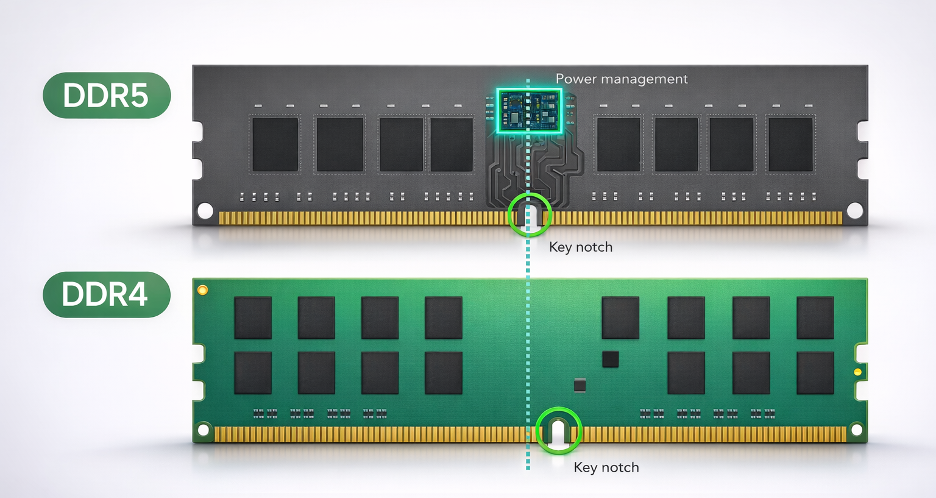
DDR4 (Double Data Rate 4) is the fourth generation of DDR SDRAM.
It became the default memory for PCs, servers, and embedded systems for many years. DDR4 offers stable performance, broad platform support, and a mature supply ecosystem.
Most embedded platforms designed over the past decade are built around DDR4.
DDR5 (Double Data Rate 5) is the next generation of DDR memory, designed to support higher data rates, higher memory densities, and improved parallel access.
It targets modern workloads that move large volumes of data continuously, such as AI inference, high-resolution video processing, and multi-core computing. Newer CPUs and SoCs increasingly support DDR5 only.
Both DDR4 and DDR5 serve the same role in an embedded AI system. They store model weights, frame buffers, intermediate tensors, and working data used by the CPU, GPU, or AI accelerator.
The difference is how efficiently and how much data they can move in parallel, which becomes critical as edge AI workloads scale.
Why Embedded AI Stresses Memory Differently than PC Performance
In an edge AI device, RAM holds camera frames, intermediate buffers, model weights, and output data at the same time.
Data flows through capture, pre-processing, inference, and post-processing without stopping. Each stage reads and writes large buffers. Memory stays busy under sustained load.
A PC behaves differently. Most workloads run in bursts. A discrete GPU handles heavy data movement using its own VRAM. System RAM sees short spikes, then idle time. Caches hide much of the latency.
Embedded AI devices rarely have that separation. The CPU, iGPU or NPU, and accelerators often share the same system memory.
Every frame passes through RAM multiple times. Memory becomes the main data path, not a background resource

Embedded AI workloads also include more than interference.
- Image resize and crop
- Color conversion such as YUV to RGB
- Normalization and layout changes
Each step can create new buffers. Batching improves throughput, but it raises memory use because multiple frames sit in RAM at once. This increases both bandwidth demand and required capacity.
Because data moves in parallel and continuously, caching helps less than on PCs. Memory stalls show up as dropped frames or higher latency.
Before choosing DDR4 or DDR5, identify the real limit in your system.
- Compute-bound systems max out CPU or accelerator usage
- Bandwidth-bound systems wait on memory transfers
- I/O-bound systems stall on cameras or storage
As stream count and resolution grow, many embedded AI systems become bandwidth-bound.
This is why RAM choice matters more at the edge. Memory speed, concurrency, and capacity directly control how much data the system can process in real time.
In the next section, we’ll cover the DDR4 vs DDR5 RAM basics that matter most for embedded AI systems.
DDR4 vs DDR5 RAM Basics
Before choosing between DDR4 and DDR5 for embedded AI, it’s important to understand the core technical differences that actually affect system behavior.
This section focuses only on what matters in practice for engineers and system designers.
Speed and bandwidth
DDR5 is the next evolution of DDR4 and starts at much higher speeds.
DDR4 tops out at 3200 MT/s under JEDEC specifications, delivering about 25.6 GB/s per channel on a 64-bit bus.
DDR5 starts at 4800 MT/s and continues to scale beyond 6400 MT/s, providing roughly 38 GB/s at DDR5-4800 and exceeding 45–50 GB/s at DDR5-5600 or DDR5-6000.
This represents a significant bandwidth increase, which is especially valuable for memory-intensive and streaming workloads.
Latency reality
Higher transfer rates do not automatically mean lower latency. DDR5 typically uses higher CAS latency values than DDR4.
While DDR5 runs at faster clock speeds, the additional latency cycles largely offset those gains.
In real systems, memory access latency for DDR4 and DDR5 stays in a similar range, often around 90–100 ns at the system level.
The practical takeaway is that DDR5 neither dramatically improves nor significantly worsens latency.
Channels and burst length
DDR5 introduces architectural changes to improve concurrency.
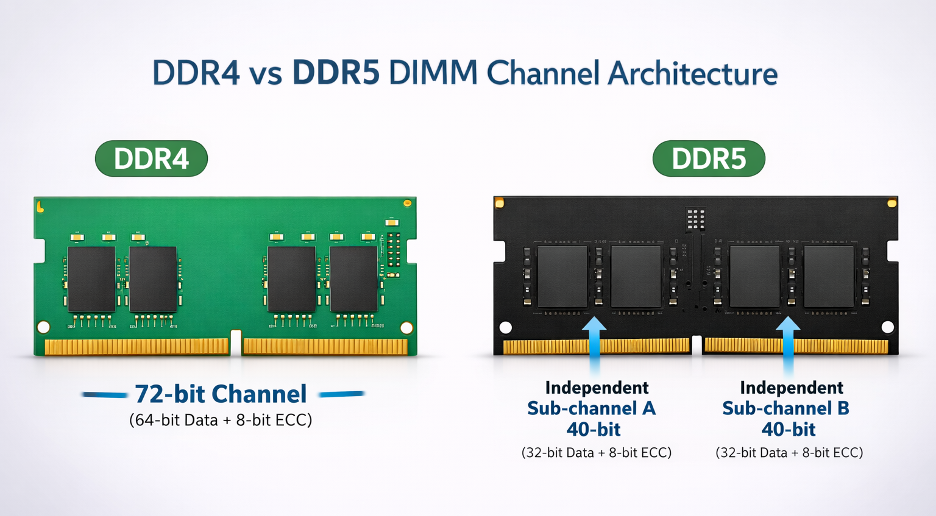
A DDR4 DIMM uses a single 64-bit memory channel, while a DDR5 DIMM is split into two independent 32-bit subchannels.
This allows the memory controller to service more requests in parallel. DDR5 also doubles the number of memory banks (from 16 to 32) and increases burst length from 8 to 16.
Together, these changes let DDR5 sustain more simultaneous memory operations and deliver more data per access.
For embedded AI, this improved parallelism helps when multiple CPU cores, accelerators, or camera pipelines access memory at the same time.
Power architecture and module design
DDR5 changes how power is delivered to the memory. In DDR4 systems, the motherboard supplies a regulated 1.2 V directly to the DIMM.
With DDR5, the module receives 5 V and regulates it locally using an onboard power management IC (PMIC). This improves power control and signal integrity but also moves some heat generation onto the memory module itself.
DDR5 modules also differ physically: DDR5 SO-DIMMs use 262 pins instead of DDR4’s 260, and the notch position is different.
These changes prevent physical interchangeability between DDR4 and DDR5 slots.
On-die ECC explained
DDR5 includes on-die ECC, which corrects certain internal bit errors within the DRAM chip itself.
This improves chip-level reliability, especially as memory densities increase. However, on-die ECC is not the same as system-level ECC.
It does not protect data on the memory bus and is invisible to the CPU. Applications that require end-to-end data protection still need ECC memory modules and an ECC-capable memory controller.
Key Differences that Matter for Embedded AI
Not every difference between DDR4 and DDR5 matters for real edge AI systems. Some specs look impressive on paper but have little impact in practice.
Below are the areas that directly affect performance, stability, and system design in embedded AI.
Bandwidth and concurrency
For many embedded AI workloads, memory bandwidth is the main limit. This is common in computer vision, multi-camera systems, and parallel inference pipelines.
DDR5 helps here in two ways:
- Higher raw bandwidth (often 50–100% more than DDR4, depending on speed)
- Better ability to handle many memory requests at the same time
This matters when:
- You process multiple camera streams in parallel
- The CPU and AI accelerator access memory at the same time
- Pre-processing and inference run concurrently
DDR5’s dual subchannels and increased bank count reduce contention. This lets the system feed data to processors more smoothly.
In practice, a DDR5-based edge AI box may support more streams or higher frame rates before memory becomes the bottleneck.
Capacity and stability
Modern embedded AI systems do more than one task. They often run:
- Larger neural network models
- Multiple models at the same time
- Containers, services, and local analytics
All of this increases memory usage. If the system runs out of RAM, performance collapses due to swapping or memory thrashing. In many cases, having enough memory matters more than having faster memory.
DDR5 supports much higher module densities than DDR4. Where DDR4 SODIMMs often stop at 16 GB, DDR5 SODIMMs commonly reach 32 GB and will scale higher over time. This is critical for embedded platforms with limited memory slots.
A 16 GB DDR4 system will usually outperform an 8 GB DDR5 system if the workload needs more memory than it has.
Power and thermals in fanless or industrial systems
Memory power affects thermal design, especially in fanless or sealed enclosures.
At the chip level:
- DDR5 runs at a lower voltage (1.1 V vs 1.2 V for DDR4)
- This improves energy efficiency per bit transferred
At the module level:
- DDR5 moves power regulation onto the DIMM
- The onboard power management chip generates heat locally
In practice:
- DDR5 can deliver more bandwidth per watt
- But DDR5 modules can run hotter under heavy load
For embedded designs, this means:
- Validate memory temperatures under full AI load
- Pay attention to airflow or heat spreading near the RAM
- Test worst-case scenarios, such as high ambient temperature with sustained inference
DDR5 works well in industrial systems, but it needs proper thermal validation, just like CPUs and accelerators.
Reliability and data integrity (ECC considerations)
Reliability matters in many embedded AI applications, especially in industrial, medical, and infrastructure systems.
DDR5 adds on-die ECC, which corrects small internal memory cell errors automatically. This improves baseline reliability of the memory chips, especially at high density.
However, on-die ECC:
- Works only inside the DRAM chip
- Does not protect data on the memory bus
- Is invisible to the CPU
For full protection, you still need system-level ECC.
System ECC
- Uses extra parity bits to detect and correct errors
- Is available for both DDR4 and DDR5
- Requires an ECC-capable CPU or SoC
If your application requires strict data integrity, ECC is non-negotiable regardless of memory generation. If your platform does not support ECC, DDR5’s on-die ECC still offers some protection and may improve long-term stability compared to DDR4.
- For normal edge AI use, both DDR4 and DDR5 can be reliable
- For safety-critical systems, design with ECC from the start
- DDR5 improves baseline robustness but does not replace true ECC
Cost vs Value
DDR5 costs more than DDR4, but the decision is not about price per GB. It is about whether memory limits your system.
In 2025, a 32 GB DDR5 kit often costs 30–50% more than DDR4. If your workload runs comfortably on DDR4, that extra spend delivers little return. In that case, DDR4 remains the better value.
DDR5 pays off only when memory is the bottleneck. Higher bandwidth can lift real throughput. For example, if DDR4 caps video analytics at 50 FPS and DDR5 sustains 65 FPS, the gain can remove the need for a faster CPU or a second device. That system-level saving outweighs the memory premium.
Capacity also affects value. If DDR5 allows you to run larger models or more services without swapping, it protects performance and stability. No bandwidth gain matters if the system runs out of RAM.
Future plans matter. New platforms increasingly require DDR5. If you expect to upgrade CPUs or reuse memory across product generations, DDR5 reduces redesign and replacement costs. DDR4 saves money today but offers less long-term flexibility.
Power and development costs are secondary but real. DDR5 can reduce energy per bit but may need better thermal validation. DDR4 remains easier to validate due to maturity.


Embedded AI Scenarios: When DDR4 Wins vs When DDR5 Wins
Choosing between DDR4 and DDR5 becomes much clearer when you look at real embedded AI use cases. Below are common scenarios that show where each memory type makes sense.
Scenario A: Single camera, light CNN, modest FPS
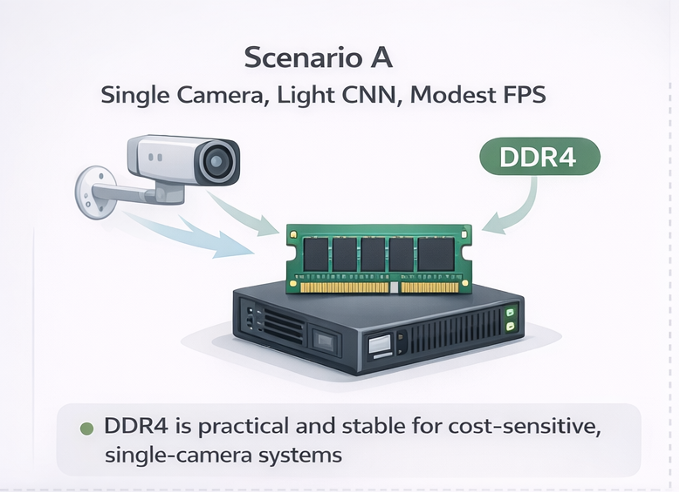
A smart camera or small AI IoT device runs one 720p or 1080p camera with a lightweight model such as MobileNet at 5–10 FPS.
The data rate is moderate, and the model size is small. DDR4-3200 provides more than enough bandwidth, and performance is usually limited by CPU or accelerator speed, not memory.
Latency requirements are relaxed, and cost and power matter more than peak throughput. DDR5’s extra bandwidth would sit unused here.
For simple, cost-sensitive, single-camera systems, DDR4 is the practical and stable choice.
Scenario B: Multi-camera 1080p/4K with heavy pre-processing
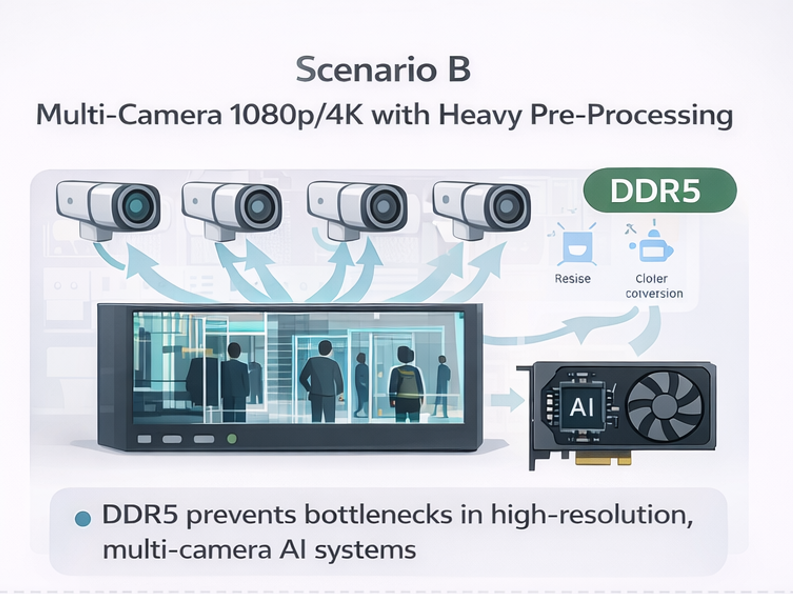
An edge AI system processes 3–4 camera feeds at 1080p or 4K, applies heavy pre-processing, and runs object detection on all streams at once.
This workload pushes large amounts of data through memory all the time. Pre-processing adds extra reads and writes, and batching increases memory pressure further.
DDR5’s higher bandwidth and better concurrency reduce memory contention and help maintain full frame rates. DDR4 often becomes the bottleneck as stream count or resolution increases.
If adding cameras or increasing resolution causes FPS drops, DDR5 provides the headroom needed to scale.
Scenario C: Edge box with iGPU or accelerator and multiple services
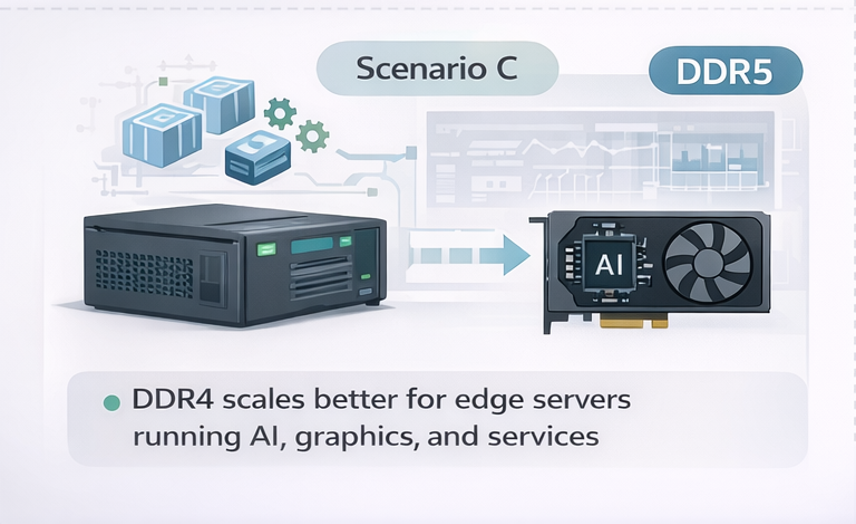
An industrial edge PC runs AI inference on an integrated GPU or accelerator while also hosting containers, analytics services, and control logic.
Integrated GPUs and shared-memory accelerators depend heavily on memory bandwidth. DDR5 improves their throughput by feeding data faster.
At the same time, DDR5 supports higher memory capacities, which helps when running multiple services or larger models. More RAM prevents swapping and keeps the system responsive under load.
For “mini edge servers” that combine AI, graphics, and services, DDR5 offers better balance and scalability.
Scenario D: Latency-critical robotics and control loops
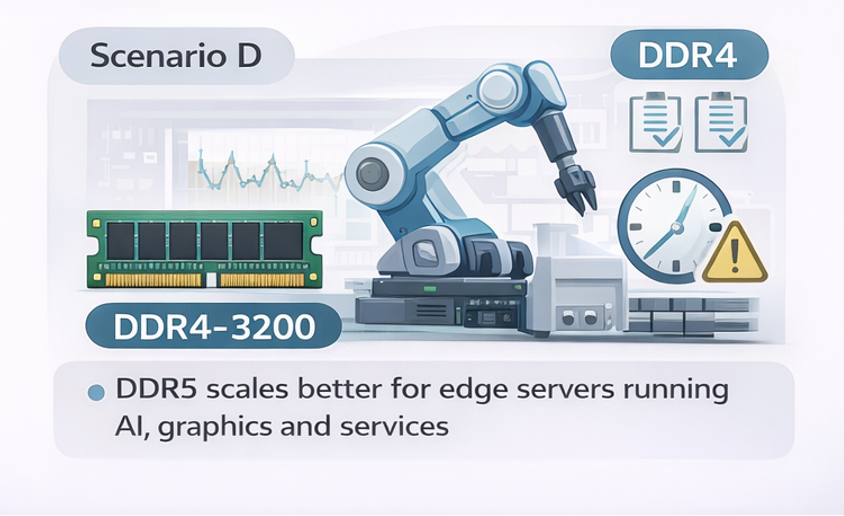
A robot or control system uses AI for vision or sensor fusion and must respond within tight time limits, such as 20–50 ms per cycle.
Consistency matters more than raw speed. Both DDR4 and DDR5 have similar average latency, but real-time systems care about worst-case delays and jitter.
DDR5 does not automatically improve latency and introduces a more complex controller and power behavior.
What to do:
- Measure p95 and p99 latency under full load
- Test memory behavior during peak AI activity
- Lock memory frequency and avoid power-saving modes that add jitter
DDR4 is a known, well-tested option for real-time systems. DDR5 can work just as well, but only with proper validation.
- DDR4 fits simple, single-stream, cost-sensitive AI devices
- DDR5 shines in multi-stream, high-bandwidth, multi-service systems
- Latency-critical systems require testing more than specs
In the next section, we’ll look at how to benchmark DDR4 vs DDR5 properly for AI workloads, so you can validate these choices with real measurements instead of assumptions.
DDR4 vs DDR5 Performance
When comparing memory types for an AI application, traditional benchmarks like gaming FPS or synthetic bandwidth tests only tell part of the story.
You need to measure what actually matters to your edge workload. Here are what to measure and a suggested test approach to fairly benchmark DDR4 vs DDR5 for AI inference:

Key performance metrics to measure:
End-to-End Throughput (FPS or inference/sec):
The ultimate measure is how many inferences per second or frames per second your system processes.
Run the full pipeline (camera input → pre-processing → inference → output) and measure the sustained FPS with DDR4 vs DDR5. This captures all effects (compute and memory).
It’s possible a memory change shows no difference in FPS if you were compute-bound, but a big jump if you were memory-bound.
Latency
Record not just the average inference latency, but the distribution. Look at 95th or 99th percentile latency to see if one memory type has more variability.
For example, maybe 99% of frames process under 30 ms with DDR5 whereas DDR4 had occasional outliers at 40 ms due to memory stalls.
Consistent latency can be as important as raw speed in AI, particularly for real-time systems.
Memory Bandwidth Utilization:
Use performance counters or a tool (like Linux perf or Intel VTune) to measure how much of the memory bandwidth is being used by your workload.
Alternatively, run a memory copy benchmark (like the STREAM benchmark) on both systems to see the max attainable bandwidth.
This gives context – e.g., DDR5 might show 2× the GB/s of DDR4 in a STREAM test, and if your app was using near DDR4’s max, you know why DDR5 helped. Monitoring tools can often show read/write throughput on the memory controller during your AI task.
CPU Utilization in Pre/Post-processing:
If you have parts of the pipeline running on the CPU (data formatting, image augmentations, etc.), measure the CPU time and see if faster memory reduces it.
A CPU bound on memory will spend a lot of cycles in “memory wait” states.
For example, if image resizing takes 10 ms on DDR4 and 8 ms on DDR5, that indicates memory speed helped (maybe due to better throughput to cache).
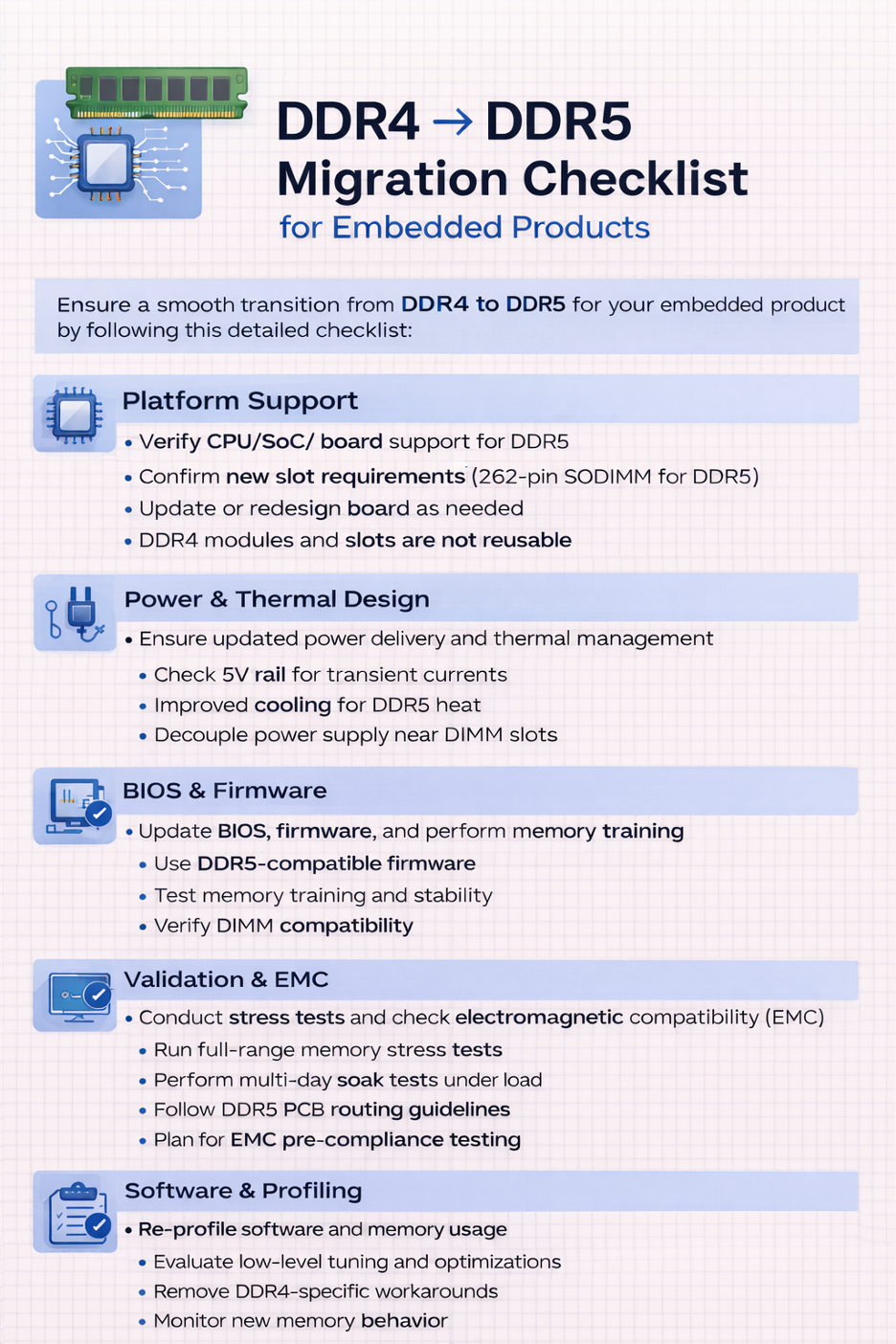
Upgrade & Migration Checklist (DDR4 → DDR5) for Embedded Products
Moving from DDR4 to DDR5 is not a drop-in upgrade. It affects platform choice, power delivery, firmware, validation, and long-term support.
If you are planning a DDR5-based revision of an existing embedded product, use this checklist to avoid surprises.
Platform support and compatibility
Start with the platform. DDR5 requires explicit CPU, SoC, and board support.
DDR5 is not backward-compatible with DDR4:
- Different signaling and electrical requirements
- Different slot keying (DDR5 SODIMM: 262 pins, DDR4 SODIMM: 260 pins)
- DDR4 modules physically cannot be reused
This often means selecting a new CPU variant, a new SBC/COM, or redesigning the board. Confirm memory support early, because platform choice usually decides DDR4 vs DDR5 before performance does.
Power delivery and thermal design
DDR5 changes where power is managed.
Instead of the motherboard regulating memory voltage, DDR5 modules include an onboard power management IC (PMIC). The board supplies 5 V (client DIMMs) or 12 V (server DIMMs), and the module regulates locally.
What to check:
- Your 5 V rail can handle transient current peaks
- Proper decoupling near memory slots
- Updated thermal analysis for the DIMM area
DDR5 modules can run warmer under sustained bandwidth-heavy workloads. In fanless designs, this may require:
- Better airflow paths
- Heat spreaders
- Thermal pads coupling the DIMM to the enclosure
Treat memory like a thermal component, not just a plug-in part.
BIOS, firmware, and memory training
DDR5 uses different training and timing calibration than DDR4.
If you design your own board:
- Work closely with the CPU or SoC vendor
- Use reference firmware and training settings
- Expect some tuning, especially at higher speeds
If you use an off-the-shelf board:
- Update to the latest BIOS
- Verify memory compatibility lists
- Avoid mixing unvalidated DIMMs
Early DDR5 platforms had more training edge cases. Most are resolved now, but validation is still required.
Validation and soak testing
Treat DDR5 as a new subsystem that needs qualification.
Recommended steps:
- Run memory stress tests across the full temperature range
- Perform multi-day soak tests with real AI workloads
- Test cold boot and warm boot reliability
- Monitor for intermittent errors under peak load
This catches issues like marginal power delivery, signal integrity problems, or temperature-related instability before deployment.
EMC and signal integrity
DDR5 operates at higher speeds, which tightens EMC margins.
If you design the PCB:
- Follow DDR5 routing guidelines closely
- Isolate memory lines from noisy circuits
- Plan for EMC pre-compliance testing
If you use a certified board, this risk is lower, but still validate at the system level.
Software and profiling check
Software usually does not need changes, but assumptions may. After migrating:
- Re-profile memory usage and bandwidth
- Re-evaluate any low-level tuning (hugepages, memory pinning, NUMA settings)
- Remove DDR4-specific workarounds if they no longer help
Memory behavior may shift slightly due to higher bandwidth and different concurrency characteristics.
Deployment monitoring
Once devices are in the field, collect data. If ECC is enabled:
- Monitor corrected error logs
If ECC is not available:
- Use watchdogs and system health metrics
- Track failures against temperature and workload
This helps detect patterns early and informs future revisions.
Documentation and customer communication
Prevent field errors. If customers can access memory:
- Clearly label DDR5-only systems
- Update manuals and service docs
- Avoid ambiguity during the transition period
DDR4 and DDR5 look similar but are not interchangeable. Clear documentation avoids support issues.
If you’re evaluating memory at the IC level, Flywing Tech provides a wide range of DDR4 and DDR5 memory ICs used in embedded and industrial designs, sourced from established manufacturers and suitable for long-lifecycle products.
Final Thoughts
Choosing between DDR4 and DDR5 for embedded AI is about removing the real bottleneck, not chasing specs.
DDR5 makes sense when memory limits performance. Its higher bandwidth and larger supported capacities help with multi-camera vision, high data rates, and running multiple AI models in parallel. If profiling shows memory pressure, DDR5 can deliver clear gains and better scalability.
DDR4 remains a strong option when workloads are modest. It is cheaper, mature, and widely supported. For many edge AI systems, DDR4 already meets performance needs, with the trade-off being long-term availability as the industry moves toward DDR5.
In short:
- Choose DDR5 if bandwidth or capacity limits performance
- Stick with DDR4 if your workload runs comfortably today
- Always align the choice with CPU support, thermals, and lifecycle plans
If you’re selecting memory for an embedded AI design, Flywing Tech can help you choose the right DDR4 or DDR5 solution.
Flywing Tech supports prototyping and production with industrial-grade memory options, ECC variants, and no minimum order quantity—making it easier to match memory to your platform and roadmap.
FAQ: DDR4 vs DDR5 for Embedded AI
DDR4 vs DDR5: what’s the difference for embedded AI?
DDR5 offers higher memory bandwidth, larger supported capacities, and better parallel access than DDR4.
This helps embedded AI systems that process high-resolution data or multiple streams at once. DDR4 is mature, widely supported, and cheaper, making it suitable for lighter AI workloads.
DDR4 vs DDR5 RAM: which is better for edge inference?
DDR5 is better when inference is memory-heavy, such as multi-camera vision, large models, or shared-memory accelerators.
DDR4 works well for small models and low frame rates where memory is not the bottleneck. Platform support also matters, since many edge CPUs support only one type.
DDR4 RAM vs DDR5: is DDR5 always faster?
No. DDR5 has higher peak bandwidth, but many workloads are not memory-bound.
If compute or I/O limits performance, DDR5 may show little or no improvement. DDR5 helps mainly when the workload streams large amounts of data.
DDR4-3200 vs DDR5-4800/6000: does MT/s matter for AI?
MT/s matters only if memory bandwidth limits performance. Vision and sensor-heavy AI workloads often benefit from higher MT/s. If memory usage is low, higher MT/s will not change results.
8GB DDR5 vs 16GB DDR4: which is better for an edge box?
Capacity usually matters more. If the workload needs more than 8 GB, 16 GB DDR4 will perform far better than 8 GB DDR5 by avoiding swapping. Choose DDR5 only if you are sure memory size is not a constraint.
16GB DDR5 vs 32GB DDR4: when does capacity beat speed?
Capacity wins whenever the smaller option cannot hold the full working set. If models, buffers, and services exceed 16 GB, 32 GB DDR4 is the better choice.
If 16 GB is enough with headroom, DDR5’s bandwidth can provide higher performance.
DDR3 vs DDR4 vs DDR5: what changed for AI workloads?
Each generation increased bandwidth, capacity, and efficiency. DDR4 enabled larger models and higher throughput than DDR3.
DDR5 continues that trend with much higher bandwidth, better concurrency, and higher module densities.
AI workloads tend to grow until they consume the available memory improvements, which is why each generation matters.