If you’re searching for RTX vs GTX, you’re not simply comparing two graphics cards with different performance numbers.
You’re comparing two different design philosophies from NVIDIA.
GTX GPUs were built around traditional rasterization. They rely primarily on CUDA (shader) cores to handle graphics workloads. For years, that approach powered everything from esports titles to AAA blockbusters.
RTX GPUs, however, introduced something fundamentally different. Alongside CUDA cores, they add dedicated RT cores for real-time ray tracing and Tensor cores for AI acceleration.
Those additions enable modern technologies like DLSS (Deep Learning Super Sampling), AI-based frame generation, and advanced encoding features used in streaming and content creation.
That architectural shift is the real reason RTX feels more “future-proof” in 2026. Even if a GTX card can still run many older or raster-focused games smoothly, RTX hardware is designed for how modern engines, AI tools, and creator workflows are evolving.
In this guide, we’ll break down the difference between RTX and GTX in clear, technical terms from ray tracing hardware and DLSS to gaming performance, AI workloads, and long-term value so you can decide which GPU makes sense for your build today.
TL;DR
- GTX GPUs are traditional rasterization-focused cards. They lack dedicated RT and Tensor cores.
- RTX GPUs add RT cores (ray tracing acceleration) and Tensor cores (AI acceleration for DLSS and AI workloads).
- In modern games, RTX can be dramatically faster because DLSS and frame generation can multiply frame rate in supported titles.
- For creators, newer RTX generations bring AV1 encoding via NVENC (Ada and newer), which matters for streaming and export workflows.
- GTX can still make sense for budget 1080p raster gaming, especially esports titles, but its feature ceiling is real.
What Does GTX Mean?
GTX is commonly expanded as Giga Texel Shader eXtreme. In simple terms, especially in 2026, GTX represents NVIDIA’s older gaming-focused lineup built around traditional raster rendering.
GTX cards rely primarily on CUDA (shader) cores to handle graphics workloads. This includes drawing geometry, shading pixels, and rendering frames using the classic raster pipeline. For many years, this approach powered most PC games.
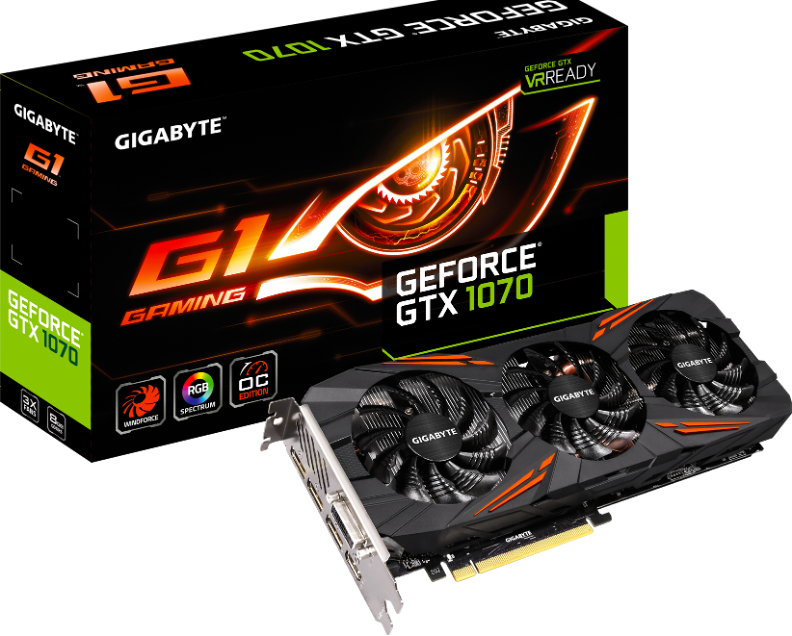
The key point in the RTX vs GTX comparison is this:
- GTX is built for traditional rendering.
- RTX adds dedicated hardware for ray tracing and AI.
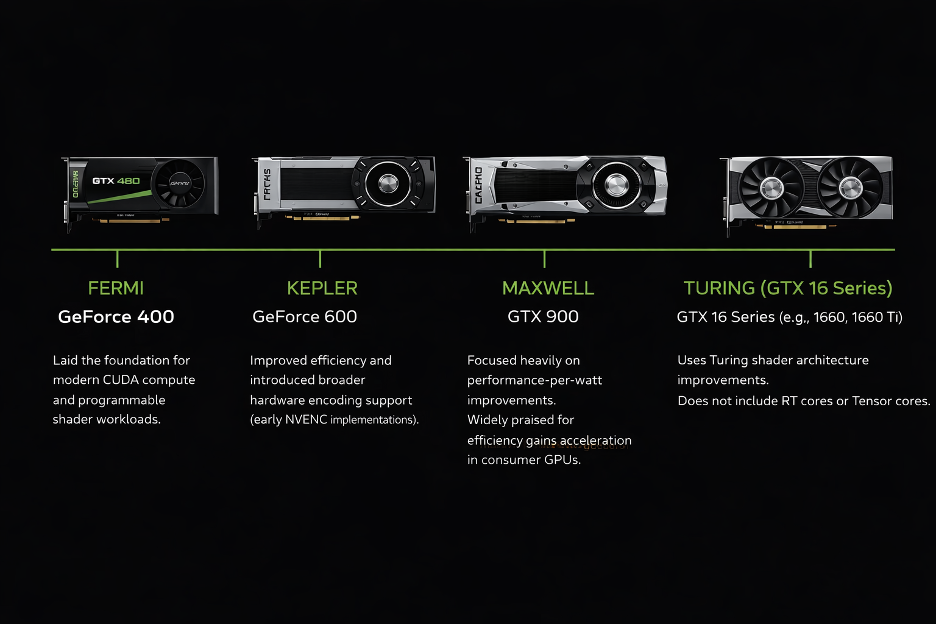
GTX cards can still deliver strong raster performance, particularly at 1080p, depending on the model. They are often affordable on the used market and remain capable for esports and older AAA titles.
However, they do not include:
- Dedicated RT cores for hardware-accelerated ray tracing
- Tensor cores for DLSS and AI acceleration
- Access to DLSS Super Resolution, Frame Generation, or Multi Frame Generation
- The newest generation of encoding features found in modern RTX GPUs
Some GTX models were later given driver-level DirectX Raytracing (DXR) support. But without RT cores, ray tracing runs on standard shader cores.
‘That means ray tracing workloads compete with normal graphics processing, causing significant performance drops.
In practical terms, GTX can still be a solid choice for raster-focused gaming on a budget. But when comparing GTX vs RTX in 2026, GTX clearly belongs to the traditional rendering era, while RTX represents the modern feature-driven GPU platform.
What Does RTX Mean?
RTX is commonly expanded as Ray Tracing Texel eXtreme, but in reality, it represents a much bigger shift than just a new name.
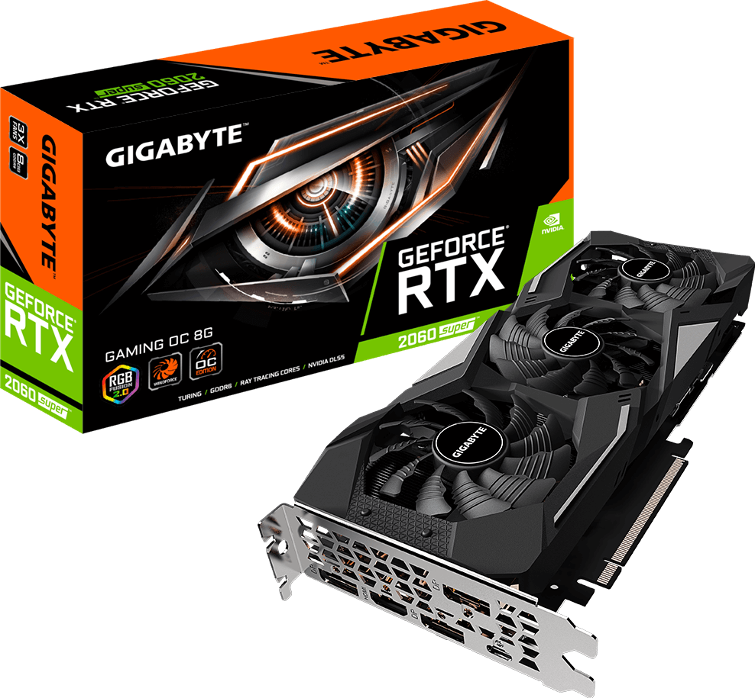
When comparing RTX vs GTX, RTX introduced a new GPU design approach:
- RTX = traditional raster rendering + dedicated ray tracing hardware + dedicated AI hardware
RTX first arrived with the Turing RTX 20-series, and continued through:
- Ampere (RTX 30 series)
- Ada Lovelace (RTX 40 series)
- Blackwell (RTX 50 series)

Over time, RTX has evolved from “experimental ray tracing” to a full platform that modern games and creative tools actively target.
NVIDIA reports that RTX technologies are now supported across hundreds of games and applications, and newer features like DLSS 4 Multi Frame Generation are expanding across more titles each year.
Here are some key traits of RTX:
- Hardware ray tracing acceleration (RT cores)
- AI acceleration (Tensor cores) for DLSS and AI workloads
- Better modern performance scaling because DLSS is widely adopted
- Newer creator features like AV1 encode on Ada and newer
RTX vs GTX: Core Architectural Differences
This is the part most “rtx vs gtx” comparisons oversimplify. The real difference is not branding.
It’s specialized silicon built for different workloads.
CUDA Cores
Both GTX and RTX GPUs rely on CUDA cores for:
- Traditional shading
- Raster graphics
- Compute workloads
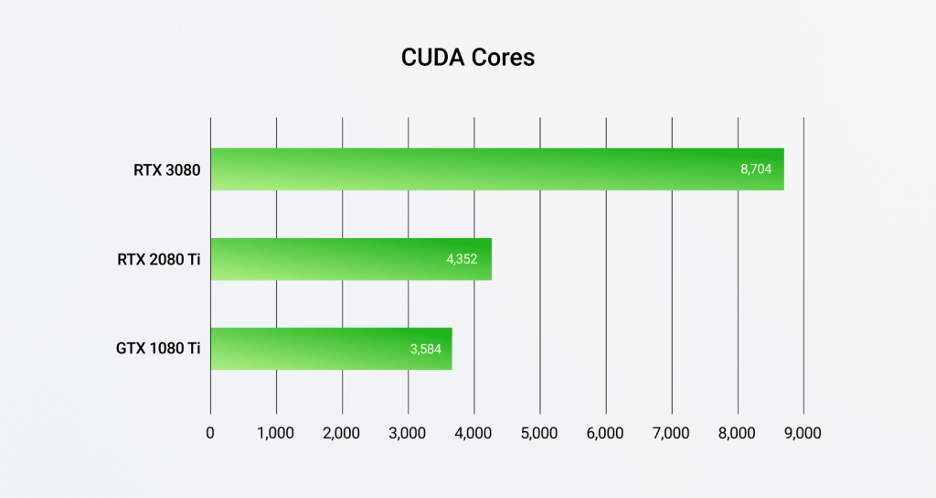
So RTX does not replace the classic rendering pipeline. It still renders frames using rasterization just like GTX.
The difference is that RTX adds new dedicated hardware blocks beside the shader cores, instead of forcing everything through them.
RT Cores
Ray tracing tries to answer one expensive question: Which object does this ray hit first?
To solve that efficiently, modern engines use an acceleration structure (like a Bounding Volume Hierarchy or BVH). DirectX Raytracing (DXR) formalized this structure to make GPU traversal more efficient.
In RTX GPUs, RT cores accelerate the most expensive parts of that process, including:
- BVH traversal (walking the acceleration structure)
- Ray–box intersection tests
- Ray–triangle intersection tests
For a deeper architectural explanation of RTX ray tracing acceleration, NVIDIA’s GA102 whitepaper is a solid reference.
Tensor Cores
Tensor cores are specialized units designed for matrix math, which is heavily used in AI.
This matters in two major areas.
A) DLSS (Gaming)
NVIDIA describes DLSS as neural rendering powered by RTX Tensor cores. It uses AI to reconstruct frames at higher performance while maintaining strong image quality.
GTX cards cannot use DLSS because they lack Tensor cores.
B) AI Workloads (Creators, Developers, Hobbyists)
Modern AI frameworks rely heavily on:
- Mixed precision (FP16)
- Matrix multiplication acceleration
- Tensor-optimized compute paths
NVIDIA’s documentation on mixed precision training ties performance acceleration directly to Tensor Core architectures.
In practical terms:
- GTX can run AI tools.
- RTX can accelerate them properly.
That’s a major difference in gtx vs rtx for AI discussions.
Hardware Encoding
Another difference that many RTX vs GTX comparisons ignore is hardware encoding.
NVIDIA’s NVENC documentation shows that AV1 encoding support begins with Ada (RTX 40-series) and continues into newer generations.
NVIDIA’s Ada architecture page also highlights AV1 encoders as a key feature.
If you:
- Stream via OBS, Discord, or YouTube
- Export video frequently (Premiere Pro, DaVinci Resolve)
- Need better quality at lower bitrates
Modern RTX GPUs offer clear advantages. GTX cards use older NVENC generations and do not support AV1 encode.
RTX vs GTX Performance Comparison
When comparing RTX vs GTX performance, it’s important to separate the discussion into three clear buckets. Many articles mix them together, which leads to confusion.
Let’s break it down properly.
Rasterization Performance (Ray Tracing Off)
This is the traditional rendering path like no ray tracing, no DLSS, just classic raster graphics.
In many esports titles and older games:
- GTX can still deliver strong 1080p performance (depending on the model).
- Games like CS2, Valorant, League of Legends, and older AAA titles rely mostly on shader throughput and CPU performance.
- In these scenarios, the gtx vs rtx gap can appear small.
However, RTX still tends to win at:
- Higher resolutions (1440p and 4K)
- More demanding modern engines
- Games with heavier lighting and post-processing pipelines
That’s because newer RTX generations benefit from architectural refinements, better efficiency, larger caches, and improved memory subsystems.2) Ray Tracing Performance
This is where RTX clearly pulls away in the RTX vs GTX comparison.
Ray tracing workloads rely heavily on:
- BVH traversal
- Ray–triangle and ray–box intersection tests
RTX GPUs include dedicated RT cores that accelerate these operations in hardware (as described in NVIDIA architecture documentation).
GTX GPUs do not have RT cores. When ray tracing is enabled:
- GTX executes ray workloads on standard shader cores.
- Ray calculations compete with shading work.
- Performance drops significantly.
In practical gaming terms:
- RTX can run ray tracing at playable settings (especially with DLSS).
- GTX can technically enable ray tracing in limited cases, but it is rarely smooth in modern RT-heavy titles.
This is one of the clearest technical differences between gtx vs rtx.
DLSS-Assisted Performance
This is the part many comparisons underestimate. DLSS (Deep Learning Super Sampling) often changes the performance winner more dramatically than raw GPU size.
Because DLSS is powered by Tensor cores, it is available only on RTX GPUs.
Modern DLSS versions include:
- DLSS Super Resolution (AI upscaling)
- DLSS Frame Generation (introduced with RTX 40-series)
- DLSS 4 Multi Frame Generation (tied to RTX 50-series in supported titles)
NVIDIA positions DLSS 4 as a major performance multiplier in supported games. Multi Frame Generation can create multiple AI-generated frames between rendered frames on RTX 50-series hardware.
This means:
- A mid-range RTX GPU using DLSS can outperform a faster GTX GPU running native resolution.
- The perceived smoothness difference can be dramatic in supported titles.
So when people compare RTX vs GTX and say: “RTX feels much faster.”
DLSS is often the reason, not just raw raster performance.
RTX vs GTX for Gaming (1080p, 1440p, 4K)
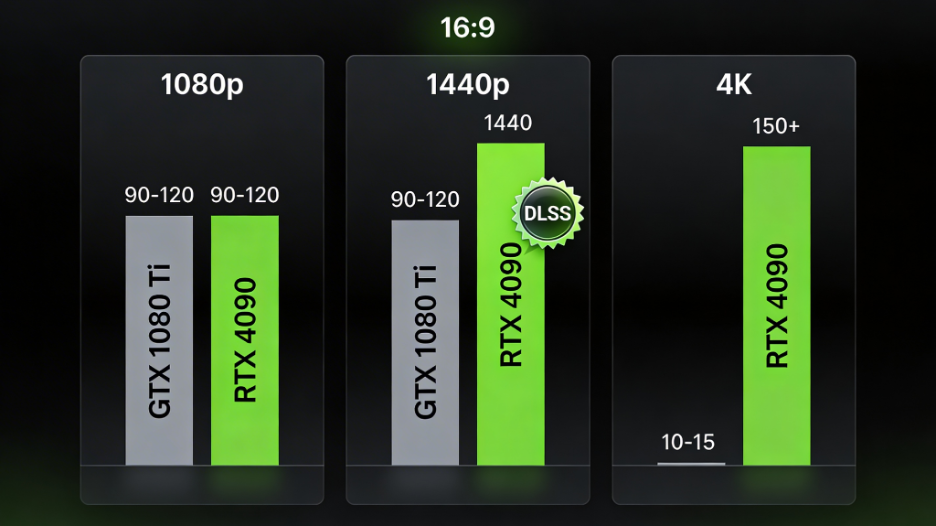
Gaming is where most people start the RTX vs GTX comparison, but the “right” answer changes a lot depending on resolution.
The higher you go, the more RTX features (especially DLSS) start to matter.
1080p gaming
At 1080p, GTX can still be viable if your focus is classic raster performance.
This is the scenario where many used GTX cards still feel “fine,” especially in competitive titles where settings are often lowered anyway.
GTX makes the most sense when you mainly play esports, older AAA games, or you keep ray tracing off.
RTX still has an advantage here, but it’s less about raw FPS and more about longevity. DLSS helps you “stretch” the card as games get heavier year by year.
1440p gaming
This is where RTX value jumps. At 1440p, GPU load rises enough that DLSS becomes a real quality/performance tool instead of a “nice-to-have.”
Even with ray tracing disabled, newer games are heavier due to denser assets, larger worlds, higher-quality lighting, and more complex effects.
RTX cards benefit from newer architecture and DLSS support, so they hold smoother performance without forcing you to drop settings as aggressively.
4K gaming
At 4K, the workload ramps up fast because you’re pushing over four times the pixels of 1080p. Add ray tracing and the cost stacks quickly.
In 2026, RTX is the practical choice for 4K because most smooth 4K experiences depend on some combination of DLSS modes and (on supported hardware) frame generation.
GTX cards can run 4K in lighter titles, but for modern AAA games they usually run out of headroom.
GTX vs RTX for AI and Deep Learning
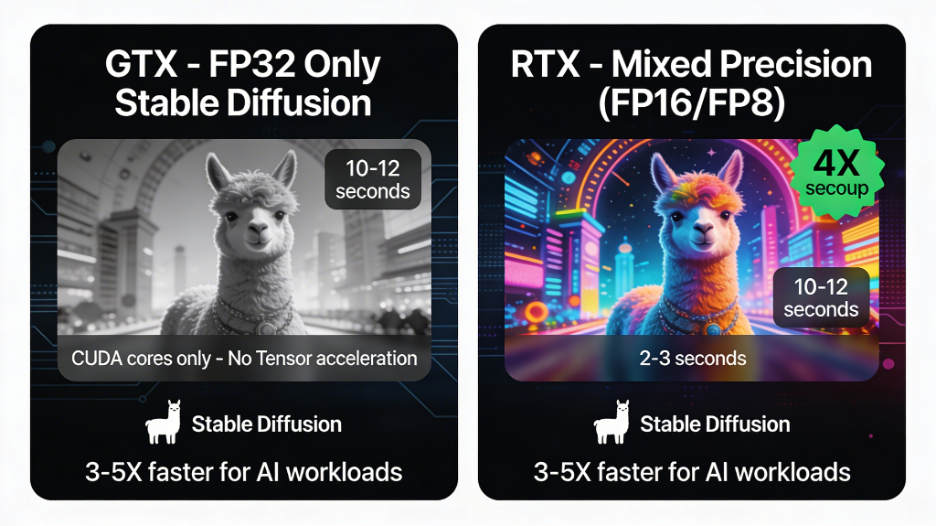
This is one of the biggest missing sections in most gtx vs rtx guides. People talk about gaming features, but AI performance is often the real deal-breaker especially if you run Stable Diffusion, local LLMs, or GPU-accelerated creative tools.
Why GTX is limited for AI
GTX cards can run CUDA workloads, but modern AI performance is strongly tied to mixed precision and fast FP16/tensor-style math.
That’s where older consumer GTX cards tend to fall behind.
A key technical reason: consumer Pascal GPUs (commonly used in GTX 10-series cards) can have extremely weak FP16 throughput compared to FP32, which limits modern AI acceleration paths.
In practice, you can run AI workloads, but training and even inference can feel slow compared to RTX hardware.
Why RTX is better for AI
RTX changes the story because of Tensor cores. They’re purpose-built for the matrix operations used in AI, and modern AI frameworks are designed to take advantage of that hardware acceleration.
The result is that RTX typically delivers much better speed for mixed precision workflows, and it scales better as models get larger or workloads get more complex. For anyone asking “RTX vs GTX for AI”, Tensor cores are usually the deciding factor.

VRAM matters more than most people expect
For local AI workflows, VRAM often becomes the limiting factor before raw compute. You can have a “fast” GPU and still hit a wall if the model doesn’t fit comfortably in memory.
A simple, realistic rule for 2026:
- 8GB VRAM: minimum viable for many Stable Diffusion and smaller AI tasks
- 12–16GB: much more comfortable for higher-res generation and larger models
- 24GB+: best for heavier local AI use and larger LLM setups
If AI is part of your workflow, prioritize VRAM and RTX generation over chasing small raster FPS differences.
Check out more info in our article on how RTX GPUs are showing up in the next wave of AI PCs: What AI Processors Did Nvidia, Qualcomm, and MediaTek Reveal at Computex 2024?
RTX vs GTX for Content Creation
For creators, the RTX vs GTX difference often shows up less as “FPS” and more as smoother editing, faster exports, better streaming quality, and accelerated rendering paths in pro tools.
Video editing (Premiere Pro, DaVinci Resolve)
The big differentiator here is the encoder/decoder block and codec support. Newer RTX generations generally bring improvements in NVENC quality and features, and Ada-era RTX cards add AV1 encoding, which is a major win for streaming and exporting at lower bitrates.
If you export frequently, record gameplay, or stream regularly, the encoder generation can matter as much as raw GPU compute.
3D rendering (Blender, Octane)
GTX can render, and for simple scenes it can still be usable. But RTX can take advantage of accelerated rendering paths inside major tools.
For example, Blender supports OptiX acceleration on RTX GPUs, which takes advantage of RTX hardware ray tracing for faster Cycles rendering. The difference becomes more obvious as scenes get more complex, lighting gets heavier, or you increase samples and resolution.
Streaming
Streaming is where newer RTX cards quietly shine. AV1 encoding (Ada and newer) can deliver better quality at lower bitrates, which matters in real workflows like Twitch, YouTube Live, and Discord screen sharing.
In simple terms: if streaming is important, RTX is often the cleaner experience because you can hold quality without increasing bitrate as aggressively.
RTX vs GTX Pricing and Support
It’s easy to say “RTX is better,” but real buyers have real budgets. In 2026, “budget GPU” usually means one of two things: entry-level RTX cards near MSRP, or used GTX cards.
New RTX features like DLSS 4 Multi Frame Generation also change perceived value in supported games, because performance can scale differently compared to raster-only benchmarks. That makes “price-to-performance” harder to judge if you only look at raw FPS charts.
If you’re shopping under a hard budget, focus on what actually extends usefulness:
- VRAM for modern games and AI tools
- DLSS support for longevity
- Encoder features if you create or stream
- Driver support horizon for long-term stability
A GTX card doesn’t stop working just because it’s older. But in 2026, support cadence matters more than many buyers realize.
NVIDIA’s support plan moves Maxwell and Pascal-era GeForce GPUs toward security-only updates over time, while newer architectures continue receiving broader Game Ready feature updates and optimizations.
What that means in real life is not “your GPU is dead.” It means you may miss:
- day-one game optimizations
- feature updates
- newer performance tuning
For long-term buyers, that support horizon is part of why RTX is often considered the safer choice in the RTX vs GTX debate.
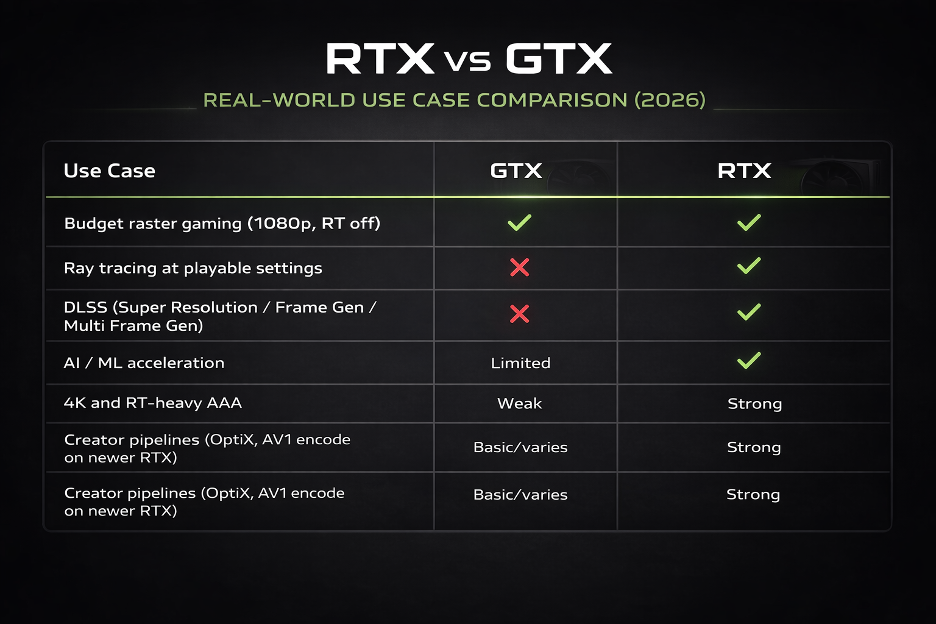
Here’s the clean decision table that matches real-world workloads.
Final Thoughts
At its core, RTX vs GTX is no longer just about raw frame rates. It’s about capability.
GTX represents NVIDIA’s traditional raster era. It can still handle 1080p esports and older AAA titles well, especially if you’re buying on a strict budget. But its ceiling is clear: no RT cores, no Tensor cores, no DLSS, and limited modern creator features.
RTX, on the other hand, is built for where gaming and computing are going — not where they’ve been. With dedicated RT cores, Tensor cores, DLSS scaling, and modern encoding support (like AV1 on newer generations), RTX cards are designed for ray tracing, AI workloads, content creation, and long-term driver support.
If you only play lightweight raster titles, GTX can still work.
If you want smoother scaling at 1440p or 4K, better AI performance, or creator-ready features, RTX is usually the smarter investment in 2026.
Choosing between GTX vs RTX also affects the rest of your system:
- DLSS support influences what monitor resolution makes sense.
- Ray tracing impacts PSU and cooling requirements.
- AI workflows depend heavily on VRAM and stable power delivery.
- Creator workflows benefit from reliable encoding pipelines and bandwidth.
That’s where Flywing Tech comes in. If you’re upgrading to an RTX card or optimizing an existing GTX build, explore:
- High-quality PCIe power cables and connectors for stable GPU power delivery
- Reliable wiring accessories for clean, safe PC builds
- Expansion components and hardware accessories for performance-focused setups
- Embedded and IoT modules if you’re experimenting with AI edge deployments
Pairing the right GPU with the right supporting hardware ensures your system runs stable under load — especially when pushing ray tracing, DLSS, or AI inference tasks.
FAQ: RTX vs GTX
Is RTX better than GTX?
Yes for modern gaming features, ray tracing, DLSS, AI acceleration, and newer creator codecs.
Can GTX run ray tracing?
Some GTX models support DXR via drivers, but it runs on shader cores and performance is limited.
Does RTX improve FPS?
Often yes, especially when DLSS is supported. DLSS 4 Multi Frame Generation can multiply frame rate in supported games on RTX 50-series.
Which is better for 1080p: GTX vs RTX?
For esports and older titles, GTX can be enough. For modern titles and longevity, RTX is better because DLSS gives you performance headroom.
GTX vs RTX for AI and Stable Diffusion?
RTX is strongly preferred due to Tensor cores and modern mixed precision acceleration paths. Stable Diffusion can run on 8GB VRAM, but more VRAM helps.
GTX vs RTX for Blender?
RTX can use OptiX hardware ray-tracing acceleration in Cycles for improved performance.