
The latest TrustInSoft Analyzer introduces a revamped graphical user interface, enhanced Root Cause Investigator, and improved compliance features, streamlining software verification processes. These updates aim to simplify project management, expedite debugging, and ensure adherence to industry standards.
What Are the Key Features of the Updated TrustInSoft Analyzer?
The updated TrustInSoft Analyzer boasts several significant enhancements designed to improve user experience and verification efficiency:
-
Revamped GUI: Transitioning from a command-line interface to a user-friendly graphical interface, it simplifies project setup and management.
-
Root Cause Investigator: This feature aids in pinpointing the exact source of runtime errors, facilitating quicker debugging.
-
Assisted Analysis Setup: Provides step-by-step guidance for configuring analysis environments, reducing setup errors.
-
Enhanced Compliance Reporting: Supports industry standards like ISO 26262 and CERT-C, ensuring software meets necessary regulations.
-
Integration with Fuzzing Tools: Allows for comprehensive testing by combining static analysis with dynamic testing methods.
Feature Comparison Chart
| Feature | Description |
|---|---|
| Revamped GUI | Simplifies project setup and management |
| Root Cause Investigator | Identifies sources of runtime errors |
| Assisted Analysis Setup | Guides users through configuration steps |
| Enhanced Compliance | Ensures adherence to industry standards |
| Fuzzing Tool Integration | Combines static and dynamic testing methods |
How Does the New GUI Improve User Experience?
The new graphical user interface (GUI) replaces the previous command-line-based system, offering a more intuitive and accessible platform for users. It centralizes access to project settings, analysis configurations, and results, streamlining the workflow and reducing the potential for setup errors. This enhancement facilitates easier collaboration among team members and allows for simultaneous management of multiple projects.
What Benefits Does the Root Cause Investigator Provide?
The Root Cause Investigator is a pivotal addition to the TrustInSoft Analyzer, designed to streamline the debugging process. It provides a centralized view of alarms and their causes, enabling users to quickly identify and address issues. By visualizing the paths leading to an error, developers can efficiently trace and resolve problems, enhancing the overall accuracy of the software verification process.
How Does Assisted Analysis Setup Enhance Configuration?
Assisted Analysis Setup offers a structured, user-friendly walkthrough for configuring the analysis environment. This feature ensures that all critical parameters are correctly set, minimizing the likelihood of configuration errors. By providing step-by-step guidance, it simplifies the setup process, making it more accessible to users with varying levels of expertise.
In What Ways Does the Analyzer Ensure Compliance with Industry Standards?
The TrustInSoft Analyzer includes enhanced compliance reporting features that support adherence to various industry standards, such as ISO 26262 for automotive safety and CERT-C for secure coding. These features automate the generation of necessary documentation and reports, facilitating the certification process and ensuring that software meets stringent regulatory requirements.
How Does Integration with Fuzzing Tools Improve Testing?
By integrating with fuzzing tools, the TrustInSoft Analyzer combines static and dynamic testing methods to provide comprehensive software verification. This integration allows for the detection of vulnerabilities that may not be uncovered through static analysis alone, enhancing the overall robustness and security of the software.
Buying Tips
When considering the purchase of software verification tools like the TrustInSoft Analyzer, it’s essential to evaluate factors such as user interface usability, compliance support, and integration capabilities with existing testing tools. Fly-Wing Technology (HK) Co., Limited, a reliable electronic components source since 2012, offers competitive pricing and a vast inventory, ensuring quick and accurate procurement of both new and hard-to-find parts. Their optimized global supplier network and in-stock inventory reduce procurement cycles and transaction costs, providing quality components at competitive prices.
Electronic Components Expert Views
“The latest enhancements to the TrustInSoft Analyzer, particularly the intuitive GUI and Root Cause Investigator, significantly streamline the software verification process. These features not only improve efficiency but also ensure that software meets critical industry standards, making it an invaluable tool for developers.”
FAQ
Q: What industries benefit most from the TrustInSoft Analyzer?
A: Industries such as automotive, aerospace, and consumer electronics, where software safety and compliance are paramount, benefit significantly from the TrustInSoft Analyzer.
Q: Can the TrustInSoft Analyzer integrate with existing development workflows?
A: Yes, the Analyzer is designed to integrate seamlessly with existing development and testing workflows, enhancing overall efficiency.
Q: Does the Analyzer support verification of both C and C++ code?
A: Yes, the TrustInSoft Analyzer specializes in the formal verification of both C and C++ source code, ensuring comprehensive coverage.
The new software updates make software verification more accurate and intuitive.
At Embedded World North America, TrustInSoft unveiled substantial enhancements to its TrustInSoft Analyzer, a tool that employs formal methods to bolster software verification processes. These advancements address the intricacies of contemporary software systems, which have surpassed the capabilities of traditional testing methods, frequently failing to uncover all potential vulnerabilities. As regulatory pressures mount and concerns over safety intensify, organizations are increasingly adopting sophisticated verification techniques capable of ensuring software precision and adherence to rigorous standards. At the event, All About Circuits sat down with TrustInSoft CEO Caroline Guillaume for an exclusive insight into the latest updates.
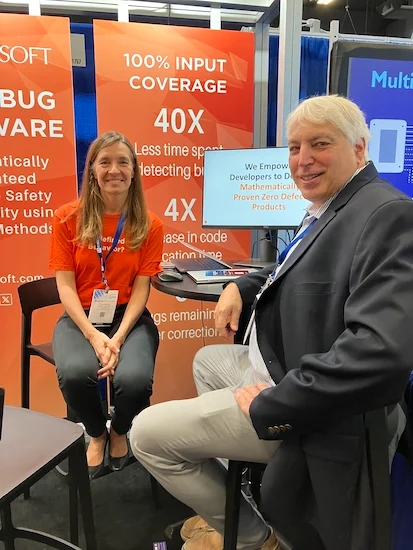
TrustInSoft CEO Caroline Guillaume (left) with All About Circuits’ editor-in-chief Jeff Child at the 2024 Embedded World North America in Austin, Texas.
TrustInSoft Rolls Out TISA Updates
TrustInSoft has rolled out substantial verification enhancements to its TrustInSoft Analyzer (TISA) software, featuring improved user experience, greater precision, and enhanced compliance with industry standards.
A key upgrade is the revamped graphical user interface (GUI), replacing the previous command-line-based project manager. This interface offers centralized access to project settings, analysis configurations, and results, streamlining team collaboration and reducing setup errors. Designed to simplify project management, the new GUI allows for quicker setups and the ability to track multiple software verification projects simultaneously.
“The new interface features are designed to enable a software developer to set up their project easily and quickly when they initiate a new analysis with our tool on a new software module,” explains Guillaume. “Now they can do so through an intuitive user interface.”
Root Cause Investigator
Another significant addition is the TrustInSoft Root Cause Investigator, which identifies problems by issuing alarms and pinpointing their root causes. Teams can then fine-tune analysis settings directly from the interface.
“The tool is extremely adept at understanding the code in-depth,” says Guillaume. “It can actually pinpoint very precisely to the root cause. Users can get alarms on where bugs are triggered, but they can also find exactly where the issue is coming from. This is achieved through the other interface we’ve implemented, called the Root Cause Investigator.”
The release also introduces automated driver generation based on function selection, ensuring comprehensive code coverage with minimal manual configuration. The new Assisted Analysis Setup feature streamlines the workflow by providing step-by-step guidance, reducing the likelihood of configuration errors and offering dynamic parameter adjustments tailored to project specifics.
“With our assisted driver generator, you pinpoint the functions or the points of the code where you want tests to be written, and the tool generates them for you,” says Guillaume.“Then you need to fine-tune the test with questions like ‘Should I test for every possible entry? Should I test for less, more,etc.’ The assistant features enable you to do that fine tuning.”
TISA also supports ARINC 653, enabling automatic analysis of aerospace programs and mapping detected issues to the Common Weakness Enumeration (CWE) database. In terms of performance, TrustInSoft claims that the new version significantly enhances the speed of analyzing complex C++ codebases, with a reported 75% reduction in overall analysis time.
The Importance of Formal Verification and Static Code Analysis
Formal verification and static code analysis are both increasingly crucial tools in ensuring software security, especially as software complexity and safety-critical applications proliferate.
Formal verification employs mathematical methods to prove software’s correctness, guaranteeing that the software will behave as expected under all possible conditions. Unlike traditional testing, which validates specific scenarios, formal verification mathematically models all potential behaviors of a system to preclude unintended errors or vulnerabilities.
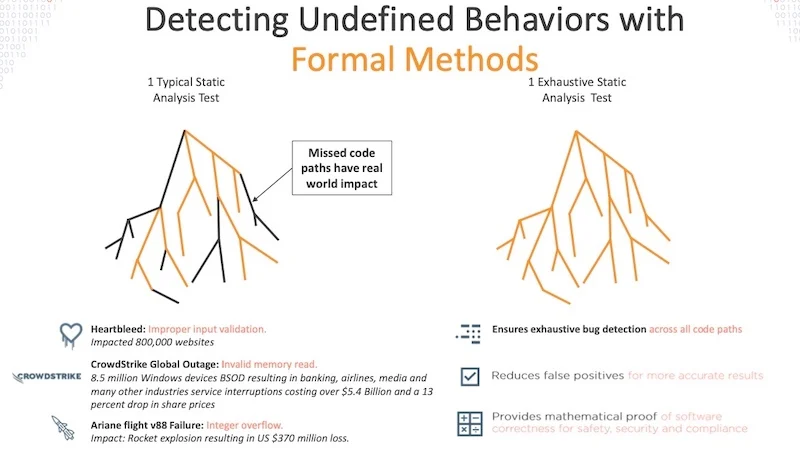
An example of why Formal Verification is important
Static code analysis inspects source code without executing it, identifying bugs, security vulnerabilities, and performance bottlenecks early in the development cycle. Unlike dynamic testing, which detects issues during execution, static analysis focuses on the structure and logic of the code. It facilitates compliance with coding standards and detects issues such as leaks, race conditions, and overflows before they manifest at runtime.
The software industry is transitioning toward formal verification and static analysis due to the increasing complexity of modern software systems. Meanwhile, regulatory standards such as ISO 26262 and DO-178C demand higher levels of safety assurance, catalyzing the shift toward these analysis methods. Traditional testing and dynamic analysis often fail to cover all possible edge cases, leaving systems vulnerable to rare but potentially catastrophic bugs. Formal methods guarantee more exhaustive coverage.
Automated and Secure Software Verification
As software complexity grows across industries, the need for robust verification methods will only intensify. Tools like TrustInSoft Analyzer offer a glimpse into how formal verification and static code analysis can become the standard in ensuring software reliability and security. This shift toward more automated, precise verification processes will be instrumental in meeting evolving regulatory standards and industry demands. By adopting such advanced methodologies, companies can more effectively mitigate the risk of failures for their software applications.
