
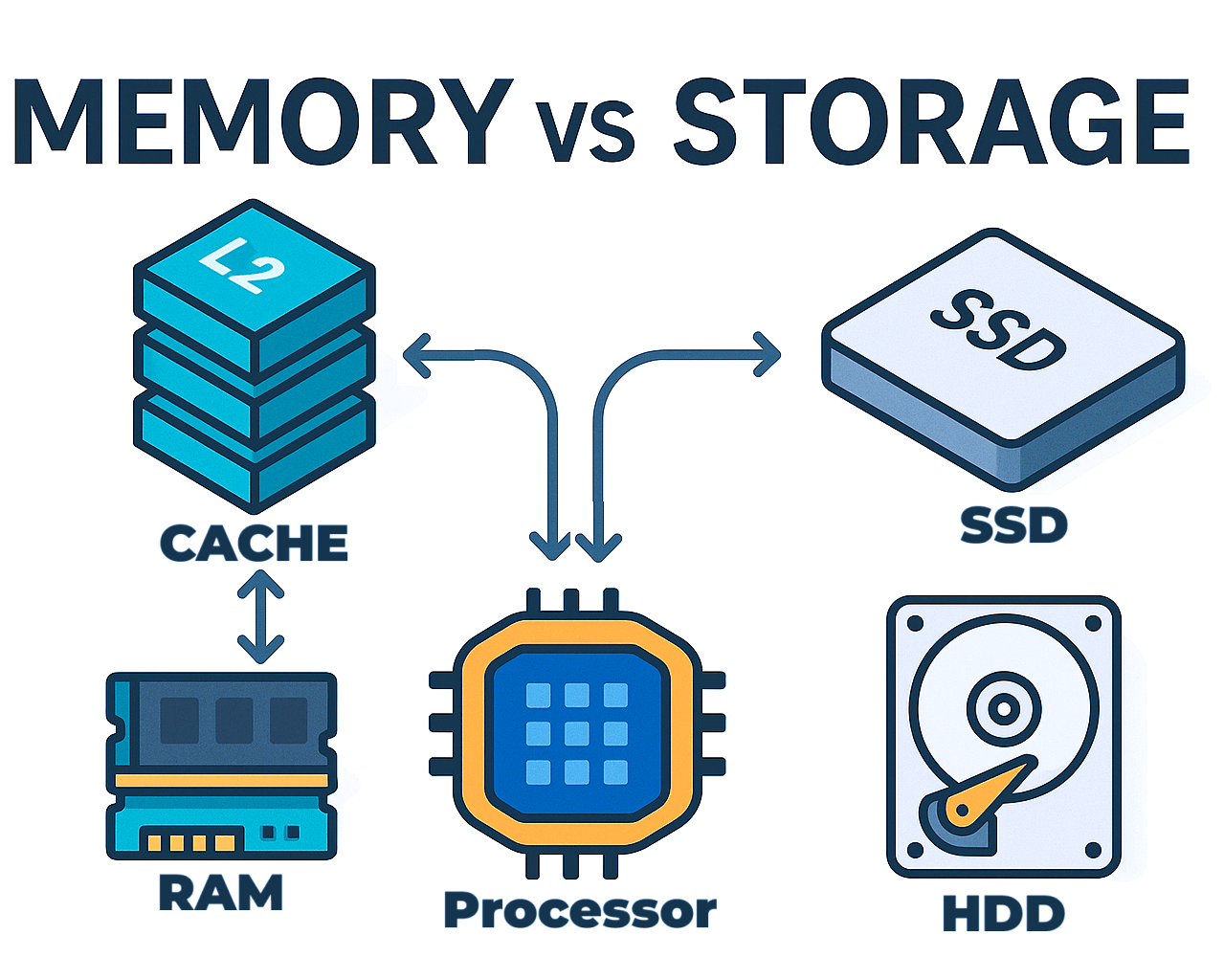
TL;DR Memory unit and storage unit are key components of any functional computing device. These devices include everyday desktops, laptops, tablets, and smartphones, as well as data centers and supercomputers. Memory (registers, cache, and RAM) holds working data temporarily for fast access, while storage (SSDs, HDDs) preserves the OS, apps, and files. A well-matched pair keeps the data pipeline flowing smoothly; otherwise, bottlenecks like paging and long load times appear. In short, both are indispensable regardless of scale, from a single user’s PC to hyperscale cloud infrastructure.
What’s the difference at a glance?
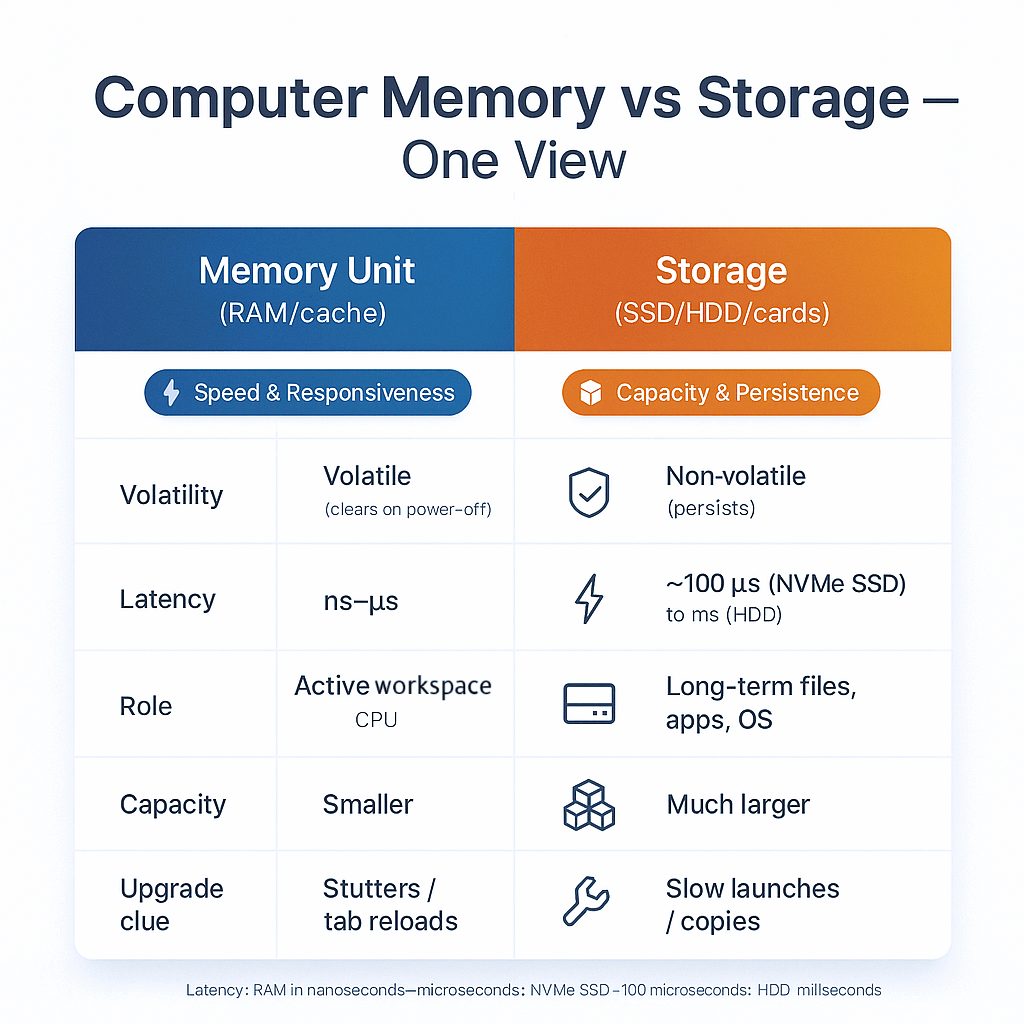
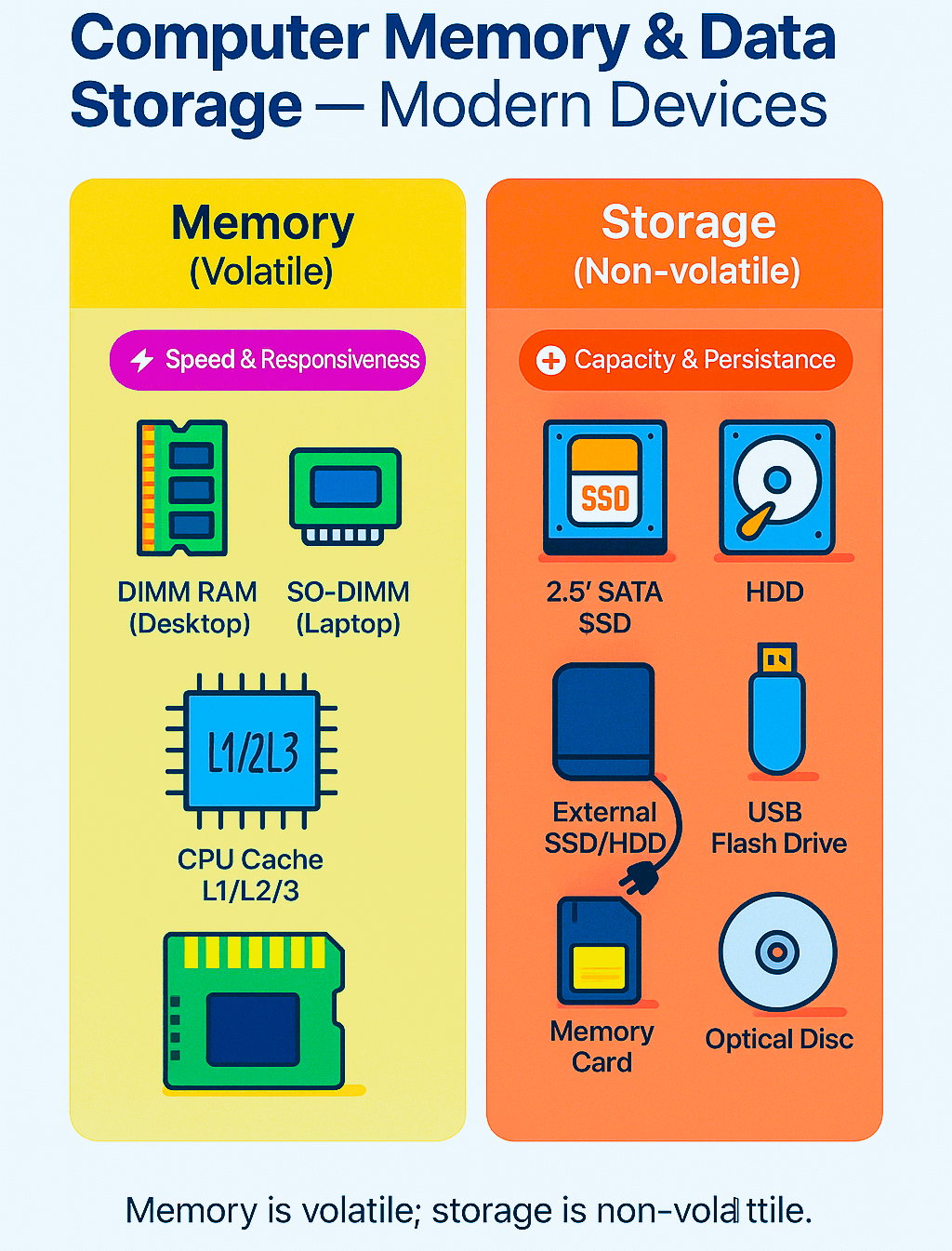
Memory units of a computer vs the storage are often confused because they do not differ in their fundamental operation; instead, the difference lies in their application. The computer memory units, like registers, cache, and RAM, make sure the CPU is fed information instantly at high speed while the program is executing. Whereas the storage components like HDD, SSD, and memory cards are used to store the date for long time even when power is unplugged from the device.
Here is the TL; DR of the memory unit vs storage of computer:
What is a memory unit, exactly?
A memory unit is the working area that holds code and data while the program executes. The computer memory consists of CPU registers, caches, and RAM to ensure the program (that processes the data), and the data (that needs processing) remain available to the CPU.
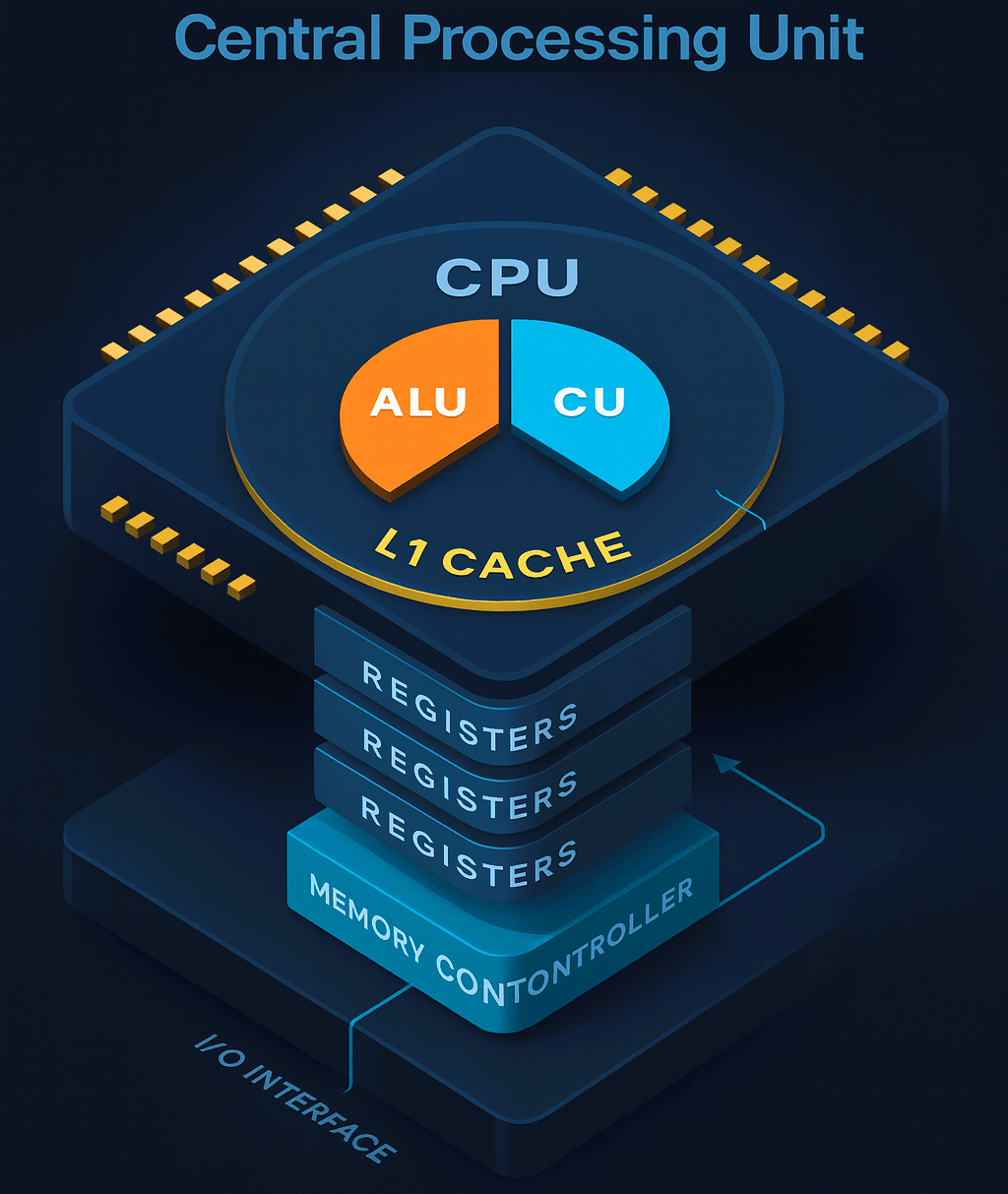
When you open an app or computer program, the system moves data from storage to RAM, and most important, data moves into to cache via the appropriate bus for immediate CPU use.
Where does the memory unit live in CPU and computer architecture?
From CPU core to outward, first and foremost working area is registers that hold the I/O information and instructions. These instructions execute in the now phase of time for CPU. Around CPU registers reside L1 and L2 cache that store the tiny slices of data and code used recently; the L3 cache holds relatively more data as shared reservoir of data and instructions. Beyond CPU chips (L1-L3, and registers reside inside CPU chip), the RAM modules (whether DDR, or LPDDR) are available to hold the rest of the working space. Typically, RAM holds active programs and data.
What is the role of Memory Controller Unit?
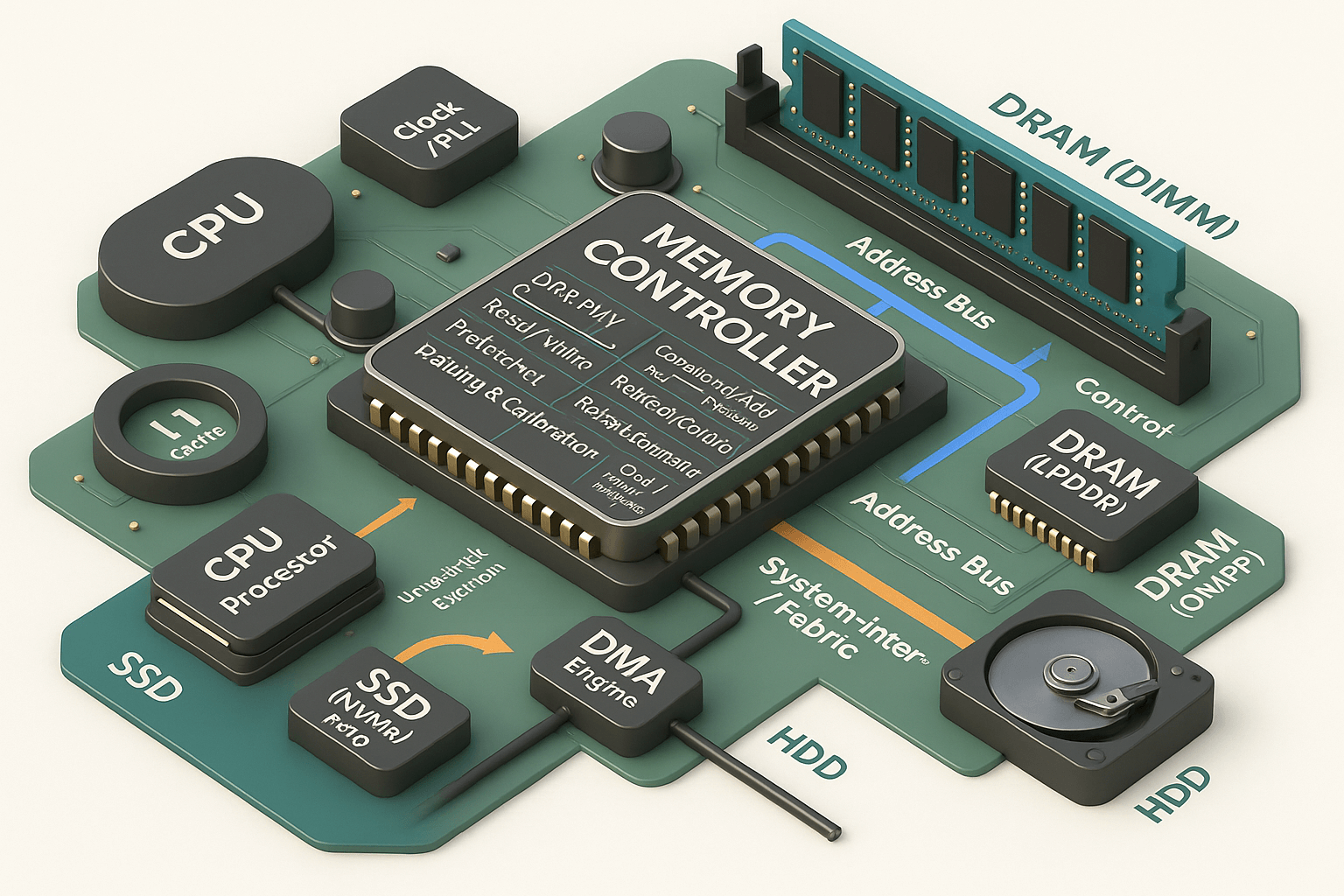
The important question here arises: how is the data exchange possible between the diverse set of data and code storage? The answer is built-in the memory control unit. This memory control unit is responsible for coordinating and accurately timing the input and output of data and commands between registers, all the way to a secondary storage device for persistent data and program storage. Likewise, the memory control unit also keeps multiple channels in effort to increase throughput of the overall system.
What is the basic unit of memory and how is capacity measured?
The basic unit of memory is a bit. A bit represents a binary on (1) or off (0) state of the system. A bit, when scaled up, makes a byte, which is a combination of 8 bits. Bytes scale up to make a higher version of memory and storage. However, two naming conventions are adopted from bytes upward:
Decimal: In the decimal system, the memory units ascend in KB, MB, GB, and TB with the step size of 1000, aligning it with SI (System International) metric system.
Binary: In binary system however,the memory units ascend in KiB, MiB, GiB, and TiB with step size of 1024, matching it with how the computers actually address the data.
The binary style is less confusing but the confusion only arises due to how vendors label the storage and memory devices, (1TB shows 0.91TB in computer).
What are primary and secondary memory units—and why does it matter?
As described earlier, primary memory refers to the memory units closest to the CPU, even on the CPU chip (cache and registers), as well as separate from the CPU chip (RAM). These memory units have volatile data capacity. They pull and push the data to and from the CPU and feed it to the secondary storage. The data is not stored in the primary memory unit.
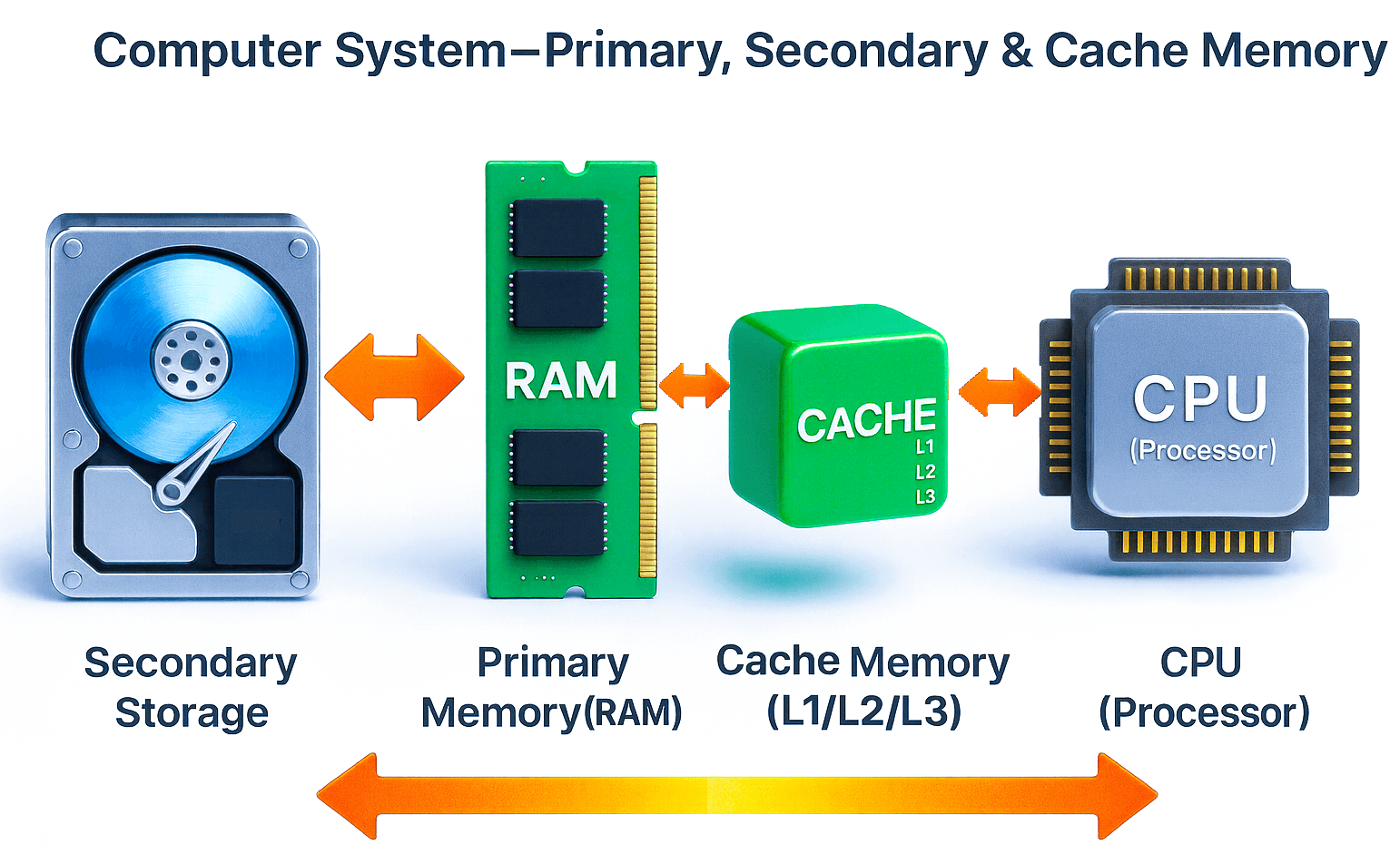
Secondary storage that includes Hard Disk Drives (HDD), Solid State Drives (SSD), optical, and network devices. The secondary storage devices are non-volatile and keep the data saved across reboots and power-offs.
The distinction between the two memory unit types is essential since, irrespective of their speeds, they serve different purposes and are not replaceable with each other. It is only the primary memory that can fulfill the CPU’s demand for immediacy, and expanding or improving the secondary memory unit cannot fulfill the primary memory unit’s requirements.
How do memory and storage work together in real tasks?
Let’s take an example of 4k video editing to understand how memory and storage work together in real-life tasks.
When you run your favorite video editing program, the program binaries are loaded from storage and occupy space in RAM. As you scrub through the video timeline, individual frames and effects occupy space in memory. The frames that you are actively editing move into cache for immediate availability to the CPU. As you continue to work on your projects, the background apps plus the project’s data start piling up. If this data exceeds the threshold, the OS evicts the memory space by pushing the least recently used pages to storage. Continuing to add further data to memory will cause the OS to freeze or straight-up crash the system.
A similar process happens when you play FPS-heavy games, do intensive data analysis, train LLMs, or open multiple browser tabs. You achieve optimum system performance when you have enough memory to hold the active usage data and storage large and fast enough to feed the pipeline without bottlenecks.
How much PC memory (RAM) do you need—and how do you choose it?
The right RAM size is not universal for each person, work, and load style. If you browse more frequently and keep tens of browser tabs open, all the while multiple design tools running in the background, 16–32 GB RAM provides ample headroom.
Professional creators, or developers who run multiple virtual machines or Docker containers, should provide 32–64 GB space to explore freely. The goal isn’t bragging rights. It is to ensure the pc memory unit covers your typical requirements so paging never becomes a normal part of your day.
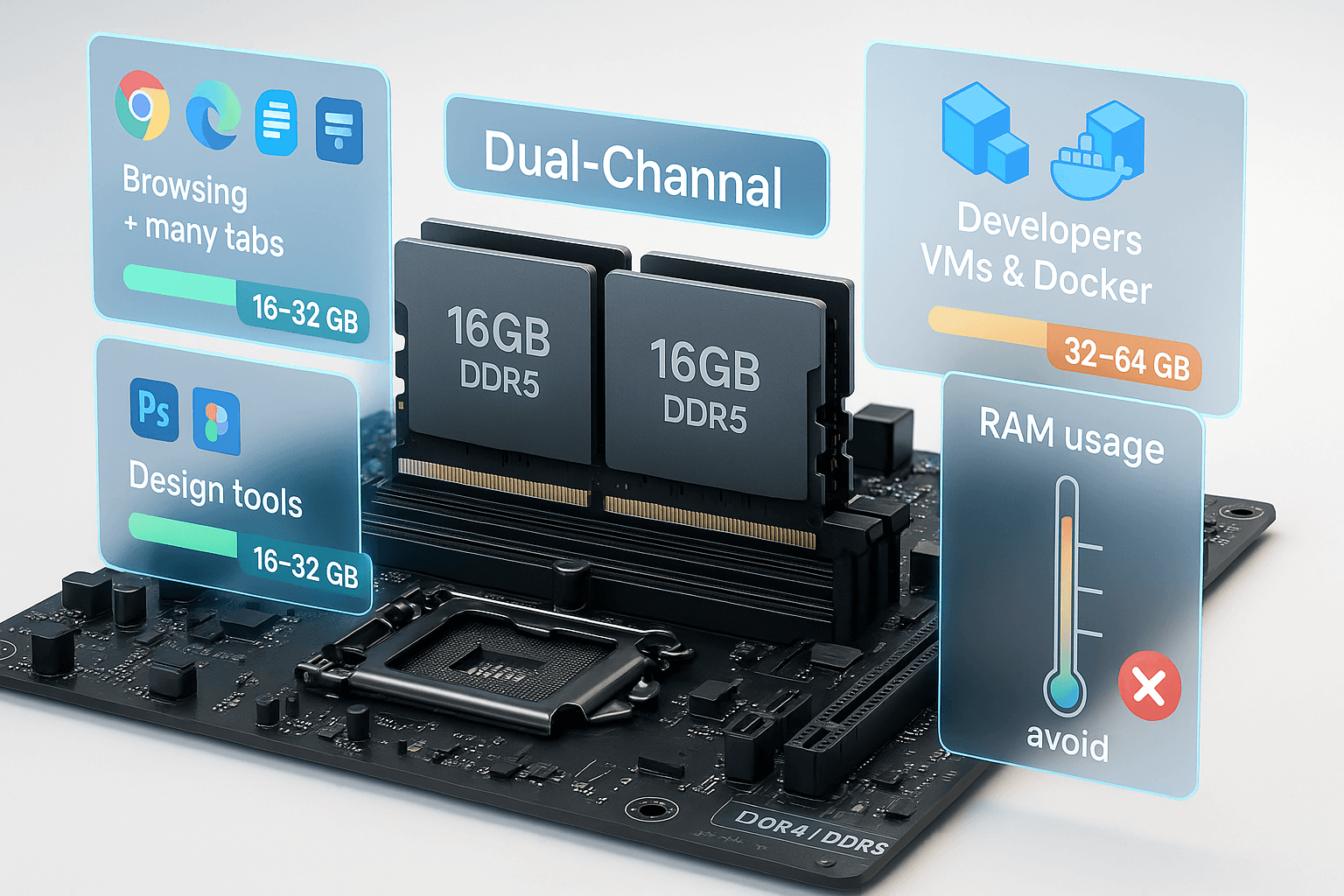
Other than matching the required RAM capacity, make sure to match the type and channels of your PC’s support. A modern desktop or business laptop will prefer dual-channel kits (two identical modules) for better bandwidth.
Are microSD “memory cards” actually memory units—or storage?
Although they may be confused as memory (since they are named and marketed as “memory cards”), microSD, SD, and console expansion cards are plain storage devices. They are excellent at moving media, and the first (and maybe only) choice to expand portable devices (smart phones, tablets, consoles) storage. Use memory cards just as you would use any other storage device (HDD/SSD). Anticipate the storage needed and buy it appropriately.
Since they are mostly used in phones, consoles, and tablets, they hardly need a reader. However, the major difference between HDD/SSD storage devices and memory cards is the need for card readers when viewing the media on a PC. Card readers—whether built into laptops or attached externally- are simply an interface between removable storage and the operating system.
What is a data memory unit in embedded/MCUs?
Microcontroller units (MCUs) also need memory and storage to function properly. The terminology to address them, however, changes slightly.
In microcontrollers, the program or code resides in Flash memory, whereas the variables, stacks, and buffers live in SRAM—the data memory unit.
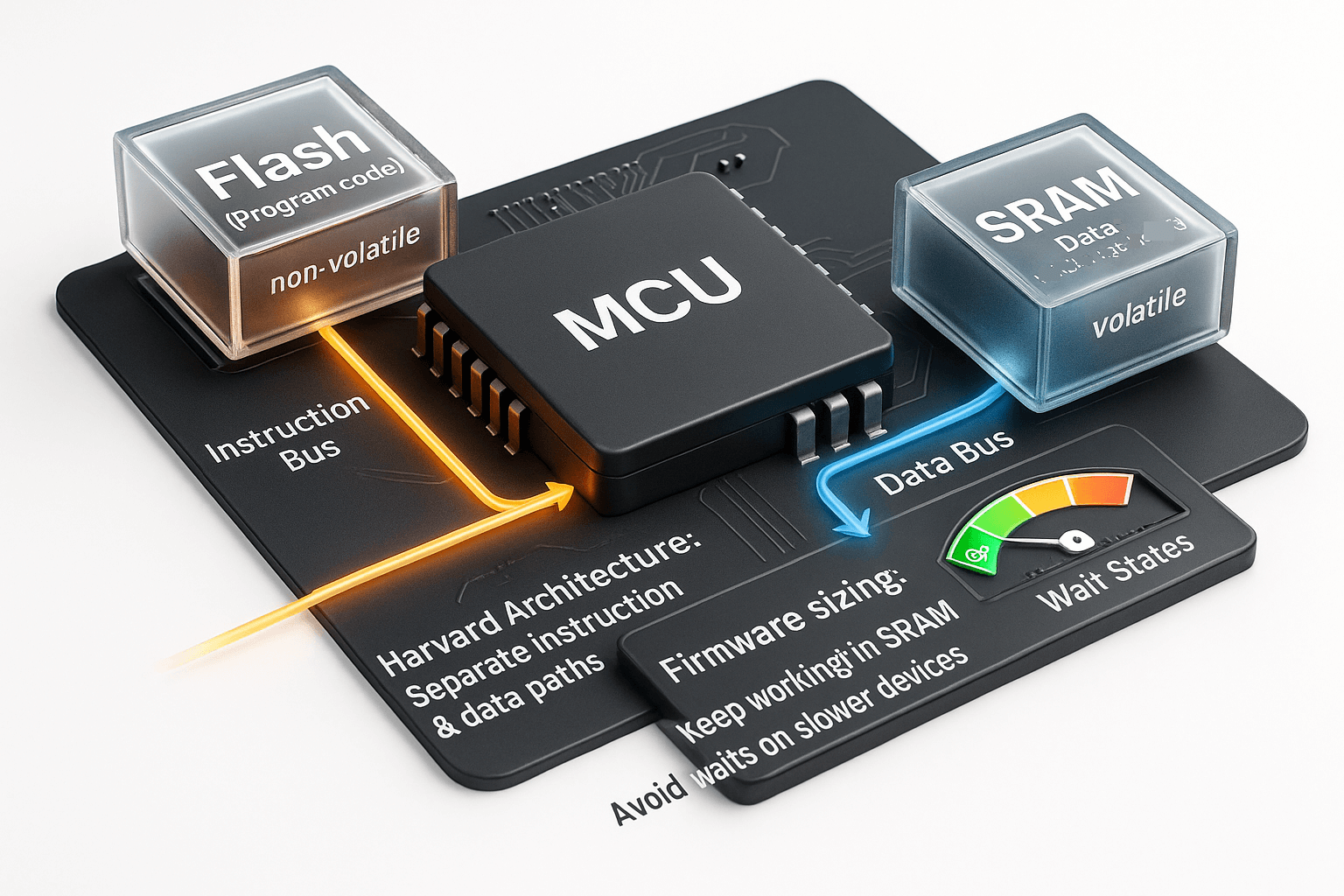
Some designs use Harvard architecture, which splits instruction and data paths so that the reads and writes don’t fight each other.
If you’re designing firmware, you anticipate and size the data memory unit the same way as a PC user sizes RAM: enough to keep the working set in fast memory so time-critical routines never trip over contention or wait on slower devices.

What should you remember before you buy or upgrade RAM?
If you think your device is slow, stutters, or loads programs or data more slowly, you might be in need of an upgrade. But these are not the only indicators you should base your upgrading decision on.
For educated decisions, audit your typical workload for a week, and track the largest projects you open simultaneously. Monitor the highest memory utilization you see during that time. This memory utilization should remain well below your installed RAM, ideally with up to 40% headroom. Once you settle on memory, find and install a fast SSD as your primary working drive. This way, you ensure enough storage and memory to handle your usual workload without worrying about system crashes.
Conclusion
The reason the “memory vs storage” confusion arises is that both devices look like capacity numbers on a datasheet. However, there is a stark difference even in numbers when you look from a technical perspective. The CPU needs the computer memory units—registers, caches, and RAM—so that it can access data immediately. Storage, on the other hand, retains the data indefinitely when you’re done, and even when the device is powered off and unplugged.
For a performance system, choose memory such that it can hold your active working data and program with enough headroom left idle. Likewise, choose storage that’s fast and spacious enough to keep your stored data safe, and leave ample space for future. This way, you let the memory and storage unit partnership make your machine feel effortless.
Glossary
| Terminology | Explanation |
|---|---|
| Primary Memory | A memory that stays closest to the CPU (Registers, Cache, RAM) and efficiently executes programs. |
| Secondary Memory | A persistent storage (SSD/HDD/optical) for files and programs. |
| ROM | Read Only Memory – non-volatile, used for boot code. |
| RAM | Random Access Memory is a volatile memory that loads data into the computer. |
| CPU Registers | Tiny memory units in the CPU that hold operands for instantaneous execution. |
| Cache Memory | Ultra-fast memory that is near CPU and keeps critical data near the CPU cores. |
| Internal Memory Unit: | Built-in RAM soldered inside the device (e.g. LPDDR in laptops or smartphones). |
| Memory Controller Unit: | A controller circuit that arranges the RAM timing and ensures fresh data to the CPU. |
| Memory Card Reader | A device used to read the data off of a memory card to the PC. |
| microSD “Memory Card” | ‘microSD’ in microSD card refers to the micro-secure digital, the micro part being form factor (not speed), and is removable storage used in phones, cameras, and game consoles. |
| Data Memory Unit | In microcontrollers, the data memory unit is SRAM that stores variables, while code often executes from on-chip Flash (storage). |
| Unit of Computer Storage | The unit of computer storage is called the byte, scaling up to KB/MB/GB/TB and beyond for persistent, non-volatile data. |
| Bit vs Byte | A bit is the basic unit of memory (0/1) that combines into bytes (1byte=8 bits). |
| Latency | The time lag or delay before the data arrives from the memory unit to the CPU. |
| Memory Channels | These are the parallel paths between various components of PC for the memory to travel on. More channels enable faster, and wider bandwidth. |
| Word (Memory Unit) | In CPU’s term, a word is native data width (e.g., 32/64 bits) that describes how CPU addresses and processes the data. |
| Bandwidth | It describes how fast a computer memory unit exchanges data (in GB/s). Bandwidth affects multitasking and computation power on PC. |
| DRAM | Dynamic RAM – Volatile main system memory that stores data temporarily |
| LPDDR | Mobile-optimized Low Power DRAM that delivers high bandwidth at low voltage for smartphones, tablets and ultrabooks. |
| SSD | Solid State Drive – Flash-based storage without moving parts— qualities include fast reads/writes, low latency, shock-resistant |
| HDD | Hard Disk Drive – Magnetic storage with spinning platters and moving heads— offers slower data access & the cheapest cost/GB |
| HBM | High Bandwidth Memory – 3D-stacked Dynamic RAM connected with TSVs on a silicon interposer, providing massive bandwidth/watt for GPUs |
| NVRAM | Non-Volatile RAM – Persistent Data Memory to retain data without power (e.g., NAND flash, MRAM, 3D XPoint) |
| L1, L2, L3 Cache | On-chip SRAM cache hierarchy, minimizes trips to DRAM to speed up the CPU L1 – smallest, fastest, per-core L2 – larger, per-core L3 – largest, shared |
FAQs
What is the memory unit of computer?
A memory unit is the most basic unit of workspace, consisting of registers, cache, and RAM. They feed data and instructions to the CPU during execution.
What is the memory unit in CPU?
Registers and cache are inside the CPU, sitting closest. They are fastest tiers of the computer memory unit.
Computer memory vs storage—what’s the difference?
Memory (RAM/cache) is a fast and volatile (data removed if unpowered) workspace, whereas
Storage (SSD/HDD/memory cards) is slower, non-volatile (data retention even when unpowered) capacity for long-term data.
What is the purpose/function of the memory unit?
Memory unit holds working data and instructions close to the CPU, enables I/O instructions buffer, caches the hot data, and optimizes the data exchange to avoid slower secondary storage access.
What are the different types of memory in a computer?
Overall, the memory in a computer consists of registers, cache (L1/L2/L3), RAM (DRAM/LPDDR), ROM, and secondary storage (SSD/HDD). Some platforms add HBM or NVRAM variants.
What are the main memory units of a computer?
Memory unit, at the tier level, refers to the CPU registers and cache (L1/L2/L3), followed by RAM (DRAM/LPDDR) that holds active data while programs run.
However, at the measurement level, capacities use bytes and its multiples such as bit → byte → KB → MB → GB → TB → PB.
What is the memory unit in computer with example?
A Bit (0/1) is the most basic unit of memory; a byte (=8 bits) is the standard unit for computer memory measurement.
What is the memory unit in computer architecture?
Primarily, it is DRAM (RAM) and is an addressable memory store that is accessible via the memory controller and system buses (address/data/control buses).
Is a microSD “memory card” a computer memory unit?
No, it is not a computer memory unit. It is non-volatile storage. The computer’s “memory unit” typically means RAM and caches.
How much RAM (PC memory unit) do I need?
For general day-to-day usage, 8–16 GB suffices. For creators and gamers, 16–32 GB is usually enough. However, for heavy pro workloads such as AI operations or Video editing jobs, 32–64 GB is preferred. Select dual-channel kits for better bandwidth.
How does a memory unit work?
The memory unit briefly stores the instructions and data that the CPU needs quickly. Controllers fetch/store lines to DRAM; caches predict and keep hot data nearby to cut latency.
What is the smallest and basic unit of memory in a computer?
The bit (0 or 1) is the smallest and most basic unit of memory in a computer. Eight bits = 1 byte is the standard unit that makes up most storage capacities.
What comes after yottabyte?
Ronnabyte (RB, 10^27) and quettabyte (QB, 10^30) are the next SI prefixes after yottabyte. They are rare in practice but officially named nonetheless.
