
A rotary encoder project can provide a customized UI for any MCU, MPU, or display by leveraging flexible firmware libraries, adaptable hardware interfaces, and modular software design. This allows seamless integration with various microcontrollers (MCUs), microprocessors (MPUs), and display technologies, enabling developers to tailor user interfaces for industrial, automotive, or consumer applications.
How Does a Rotary Encoder Interface with Different MCUs and MPUs?
Rotary encoders connect to MCUs (e.g., STM32, ESP32) and MPUs (e.g., Raspberry Pi, BeagleBone) via GPIO, interrupts, or dedicated peripherals like QEI (Quadrature Encoder Interface). Key methods include:
-
Polling: Simple but inefficient for high-speed encoders.
-
Interrupts: More responsive, ideal for real-time systems.
-
Hardware Decoders: Offload processing (e.g., STM32’s TIMx, LPC55xx’s CTIMER).
Chart: MCU/MPU Compatibility with Rotary Encoders
| Device | Interface Method | Max Frequency |
|---|---|---|
| STM32F4 | TIMx QEI | 10 MHz |
| ESP32 | GPIO + Interrupts | 1 MHz |
| Raspberry Pi | Software Decoding | 100 kHz |
What Are the Best Display Options for Rotary Encoder Projects?
A rotary encoder project pairs well with:
-
OLED Displays: Fast refresh rates, low power (e.g., SSD1306).
-
TFT LCDs: Color-rich, touch-compatible (e.g., ILI9341).
-
E-Paper: Energy-efficient for static UIs (e.g., Waveshare).
How to Customize UI Logic for Rotary Encoder Input?
Custom UIs require:
-
Event Handling: Map encoder steps to menu navigation.
-
Debouncing: Filter noise via hardware (RC filters) or software (state machines).
-
Modular Code: Use libraries like Encoder (Arduino) or HAL (STM32).
Chart: Rotary Encoder UI Customization Workflow
| Step | Tool/Library | Outcome |
|---|---|---|
| Signal Read | Hardware Timer | Raw pulse count |
| Debounce | Schmitt Trigger | Clean transitions |
| UI Update | LVGL/Embedded GUI | Dynamic display |
Buying Tips
For a rotary encoder project, prioritize:
-
Encoder Type: Optical (high precision) vs. mechanical (durable).
-
MCU/MPU Support: Ensure compatibility with QEI or interrupt pins.
-
Display Interface: SPI/I2C for easy integration.
-
Supplier Reliability: Fly-wing Technology offers genuine encoders, MCUs, and displays at competitive prices, with global stock and traceable components.
Electronic Components Expert Views
“Rotary encoders bridge tactile input and digital control, but success hinges on choosing the right decoding method. Hardware QEI minimizes CPU load, while modular UI libraries like LVGL accelerate development.” — Dr. Lin Chen, Embedded Systems Engineer.
FAQ
Q: Can a rotary encoder work with any MCU?
A: Yes, but performance varies. STM32’s hardware QEI outperforms software decoding on basic MCUs.
Q: What’s the best display for low-power rotary encoder projects?
A: OLEDs (e.g., SSD1306) balance power efficiency and responsiveness.
Q: How to reduce rotary encoder noise?
A: Use hardware debouncing (RC filters) or software algorithms (finite state machines).
Kickstarter project Rotary Encoder aims to bring touch screen rotary encoders to the DIY electronics community.
When developing interactive hardware, especially in IoT and embedded systems, engineers implement a wide variety of input methods that range from traditional buttons and knobs to more modern touch sensors and touch panels.
As an alternative, companies have started to offer innovative crossovers between the tactile features of mechanical components and the interactive capabilities of multi-touch displays. One recent example comes from Rotary Encoder, an MCU/MPU-based touchscreen rotary encoder launched as a Kickstarter project in last summer.
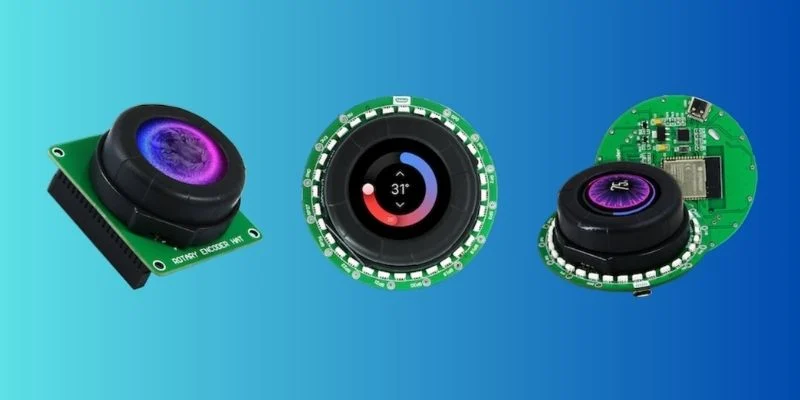
Rotary offers three different variations: Rotary HAT (left), Rotary ESP32 (center), and Rotary Pico W (right). Image (modified) used courtesy of Rotary and Kickstarter
In this article, we’ll take a look at the variants of this platform, its key features, and potential use cases for engineers using them in their projects.
The Hardware Behind Rotary
Rotary Encoder is an open-source touchscreen rotary encoder component that can be embedded into projects as a miniature, interactive, and tactile UI.
The base device includes a mechanical ring that rotates around a stationary 1.28-inch, 240 by 240-pixel circular touch LCD with a color depth of 24 bits. In addition, the device features an array of 32 RGB LEDs placed in a ring formation around its main assembly.
Rotary offers three distinct variants of its platform:
- Rotary—Pico W Powered, based on the Raspberry Pi Pico W
- Rotary—ESP32-S3 Powered, based on the ESP32-S3
- Rotary—Raspberry Pi HAT, intended for use with single-board computers like the Raspberry Pi
Alongside the display and rotary encoder assembly, the first two versions (around $77) feature an embedded development board soldered onto the device itself, while the HAT (around $52) features a block of Raspberry Pi breakout pins.
Rotary Pico W carries a standard RP2040 microcontroller board with a dual-core Arm Cortex M0+ processor clocked at a speed of 133 MHz with 264 kB of SRAM and 2 MB of flash memory. Similarly, Rotary ESP carries an ESP32-S3 chip with a dual-core XTensa LX7 microcontroller running at 240 MHz with 384 KB of ROM and 512 KB of SRAM.
Both versions support Wi-Fi 802.11 and Bluetooth LE (low energy) and can be programmed directly via the USB interface. Users can also break out remaining GPIO pins for use with other components such as sensors, actuators, and peripherals.
Implementing Rotary
According to the developer, this device is compatible with the most popular free and open-source embedded graphics library, LVGL. It also supports many IDEs and programming languages, such as Arduino and MicroPython, commonly used with the Pico and ESP development boards.
Through Rotary, engineers can create various types of graphical user interfaces by combining widgets, animations, buttons, sliders, and other data visualization elements along with the touch display and rotary encoder assembly. Other components can be integrated into their designs via the remaining GPIO ports.
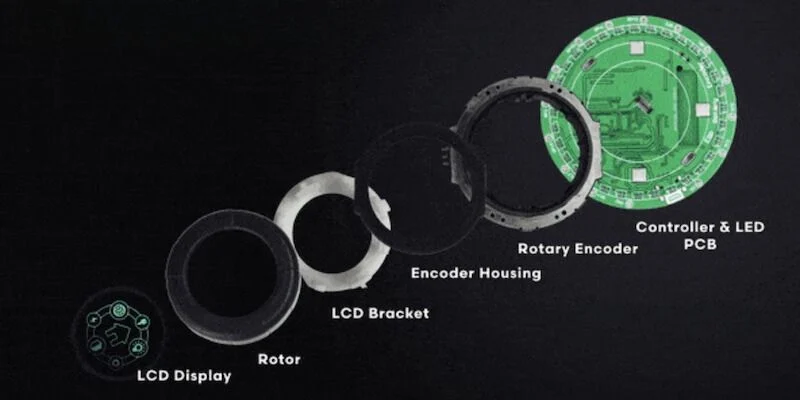
The rotary structure. Image (modified) used courtesy of Rotary and Kickstarter
Additionally, engineers can connect their Rotary systems to the internet or use them to build personalized networks thanks to the Wi-Fi and Bluetooth-enabled Pico W and ESP32 hardware and libraries. Doing so would allow Rotary to wirelessly control home automation appliances or be controlled by devices such as smartphones or wearables.
Created with the Internet of Things in mind, the Rotary platform can find potential applications in many systems ranging from wireless MIDI controllers and interactive programmable macro pads to wall-mounted HVAC remotes and smart window curtain controllers.
Lowering the Barrier to Entry
In the past, developers have aimed similar products toward the enterprise market. Through this Kickstarter project, however, Rotary seems to be catering to the DIY engineering community, intending to capture a wider audience by embedding the most popular MCU platforms into its technology.
At the time of this article posting, Rotary has already surpassed its £500 goal by a huge mulitple, curently at £13,504. The project is expected to be the subject of many interesting DIY projects. Rotary opened for shipments in September last year.
